Key Takeaway: Multiple Pinterest accounts manage karna do alag problems me toot ta hai jinhe log aksar confuse karte hain. Business Manager access solve karta hai: logins, roles, billing — un accounts ke liye jo openly related hain (ek operator ka portfolio, ek client ke account ke andar agency staff, ek parent company aur uski in-house teams). Infrastructure (ek isolated environment plus per-account ek dedicated mobile proxy) operational footprint solve karta hai: IP, browser fingerprint, aur geo signal jo har account Pinterest ki distribution ko present karta hai. Aapko dono layers chahiye, ek, ya koi nahi — yeh aapki actual situation par depend karta hai; neeche paanch cases lagbhag har kisi ko cover karte hain.
Bahut sare fully legitimate operators multiple Pinterest accounts manage karte hain. Ek marketing agency har client ke liye ek Pinterest presence chalati hai. Ek consumer-goods company per regional market, ya per audience segment, ya per product line ek Pinterest account chalati hai. Ek solo SMM operator ek business account aur ek personal rakhta hai, kabhi-kabhi side niche ke liye teesra bhi. Jaise hi aap ek Pinterest profile se aage badhte hain, har account Pinterest ko khud ko kaise present karta hai yeh operational problem ban jata hai jo soch-vichar maangti hai.
Yeh guide usi operational layer ke baare me hai: Pinterest ke quality systems kya dekhte hain, Pinterest ke apne tools (account linking, Business Manager) kya already solve kar dete hain, aur kahan dedicated infrastructure — per-account environment plus per-account mobile-network identity — pick up karta hai.
Yeh guide kya hai
Multiple Pinterest accounts chalana iska matlab yeh nahi hai ki aap chhupa rahe hain ki unka owner ek hi hai. Pinterest ki Community Guidelines un cases ko prohibit karti hain jahan multiple accounts “Pinterest platform ko manipulate karne ke purpose se” aur “accounts en masse” banaye gaye ho — ek operator ke chalaye multiple accounts ke existence ko nahi. Ek agency jo openly multiple clients ke liye Pinterest accounts chalati hai, woh wahi kar rahi hai jo Pinterest ki Business Terms of Service anticipate karti hai: “If you open an account on behalf of a company, organisation or other entity… you promise that you are authorised to grant all permissions and licences provided in these Terms.” Ek company jo US-targeted aur Europe-targeted Pinterest account chalati hai, woh do distinct audiences ko localized experience present kar rahi hai.
Aapke accounts openly same corporate domain ko apne contact emails par use kar sakte hain, same payment entity, same registered company name. Jo cheez independent honi chahiye woh hai har account ka operational footprint — uska device, network, behavior, language, aur geo — taaki Pinterest ke quality systems har account ko uski apni activity par evaluate karein, ek se doosre me signals bleed nahi karte.
Baaki guide is footprint ko set karne ke baare me hai.
Why Pinterest is still worth the operational work in 2026
Pinterest ek visual discovery engine hai, feed-based social network nahi. Users intent type karte hain (“boho wedding centerpieces”, “small balcony garden ideas”, “preppy fall outfits”) aur Pinterest apne search index se Pins serve karta hai — yeh Google ke kareeb hai, Instagram ke nahi. Aaj publish kiya hua Pin search results me mahino ya saalon tak surface karta reh sakta hai; har save aur click uski ranking strengthen karta hai. Pinterest un few major platforms me se ek hai jo Pins ko aapki apni site par link out karne deta hai, jabki Instagram, TikTok, aur Facebook outbound traffic deliberately suppress karte hain.
Is long-tail behavior ke peeche ke numbers 2026 me bhi strong hain: Pinterest ne Q1 2026 me 631 million monthly active users report kiye, year-over-year 11% up , aur quarterly revenue $1.008 billion (+18% YoY) raha. Audience se zyada important hai economics: kyunki Pins paid impressions ke bajaye organic search ranking se clicks earn karte hain, ek well-targeted Pin saalon tak qualified buyers ko aapke product page tak quietly bhej sakta hai, lagbhag zero marginal cost par. Meta ya TikTok ka ad us second visitors lana band kar deta hai jis second aap budget pause karte hain; ek Pin chalta rehta hai. Yahi cost-per-buyer gap reason hai ki affiliate marketers, niche-content sites, aur Shopify operators Pinterest ko ek serious acquisition channel maante hain — aur isi liye woh multiple accounts ke across scale karna chahte hain.
Aur kyunki yahi channel legitimate multi-account operators aur spam farms dono ko attract karta hai, Pinterest account hygiene ko Meta ki tarah enforce karta hai.
Which case are you actually in?
“Pinterest multi-account” se related sare questions paanch situations me se kisi ek me aate hain. Neeche apna case dhoondho — answers alag hain, aur kuch cases me actually multi-accounts ki zaroorat hi nahi.
Case A — Multiple independent businesses (your portfolio, or an agency’s clients)
You are here if: aap kai distinct brands operate karte ho, ya aap ek agency ho jo multiple clients ke saath kaam karti hai.
Multi-accounts? Haan — per real business ek Pinterest account.
Right Pinterest tool: har business apna khud ka Business Manager chalata hai. Pinterest ke docs explicit hain ki parent/child BM hierarchy me child accounts wahi hone chahiye jo aap own karte ho; client-owned accounts client ke BM par hi rehte hain, aur aapki agency staff har client ke BM me Partner access request karti hai. Clients ko ek hi agency BM me mat dabao.
Proxies? Haan. Pinterest accounts ko IP aur device fingerprint ke basis par cluster karta hai jab association risk evaluate karta hai. Aapki ek hi office workstation se chalne wale paanch clients Pinterest ko paanch visibly co-operated accounts dikhte hain; ek pe issue baaki par bhi reflect ho sakta hai. Per account ek isolated environment plus ek mobile proxy unhe network layer par independent rakhta hai.
Case B — Same business, multiple country markets (US + UK + DE…)
You are here if: aap ek brand chalate ho aur kai country markets me presence chahte ho.
Multi-accounts? Aksar nahi. Pinterest ke ads natively country, region, metro, postal-code targeting support karte hain — ek account, multiple campaigns, har ek market ke liye pointed. Pinterest ki community guidance generally ek account with regional boards in local language ko split karne par prefer karti hai.
Per-country accounts me split karne ke actual reasons:
- aap har market ke liye fully native account identity chahte ho (local profile name, language, locally-managed content)
- har market ki apni team aur approval process hai
Proxies? Sirf agar split karte ho. Har per-country account ko country-matched mobile IP chahiye taaki woh Pinterest ki distribution ko natively local lage. Ek .de account jo US office IP se chalta hai, ek geo-mismatch signal hai jo reach kam kar sakta hai chahe content sahi ho.
Case C — Same business, multiple niches, categories, or strategies (and A/B testing)
You are here if: ek brand alag-alag audiences ke liye content own karta hai — fashion + food, B2C product + B2B services — ya aap do distinct content strategies ko side by side A/B-test karna chahte ho.
Multi-accounts? Tabhi split karo jab audiences overlap nahi karti. Pinterest ka algorithm niche focus ko reward karta hai; ek account jo unrelated verticals ke across pin karta hai, sab ke liye recommendation signal dilute kar deta hai. Test: kya same Pinterest user dono ko follow karega? Haan → ek account, alag boards. Nahi → alag accounts.
A/B testing strategies specifically: ek hi niche me parallel strategies chalane wale do accounts, agar IP, device, aur fingerprint share karte hain, toh Pinterest ko visibly co-operated dikhte hain. Aap jo measure karte ho woh partly strategy ban jata hai aur partly Pinterest ka yeh decide karna ki do accounts duplicates hain. Clean separation hi A/B comparison ko meaningful banata hai.
Proxies? Haan jab split karte ho. Same logic as Case A — independent accounts ko independent operational footprints chahiye, warna Pinterest unhe ek treat kar sakta hai.
Case D — One account, distributed team (3 marketers in 3 countries, 24/7 shifts)
You are here if: ek Pinterest account, alag-alag physical locations se login karne wale kai log.
Multi-accounts? Nahi. Yeh woh case hai jo log aksar galat build karte hain. Aapko multiple accounts nahi chahiye — aapko Business Manager Employee roles chahiye. Har marketer ko ek account me apna khud ka login milta hai, 2FA ke saath, no shared password. Yahi BM Employee role ke liye banaya gaya hai.
Gotcha: Pinterest per session IP aur device track karta hai. Operators commonly report karte hain ki jab ek account short order me bahut alag locations se login karta hai, toh extra verification prompts aur reduced trust trigger ho sakte hain — Pinterest ka apna two-factor authentication tooling exactly is risk surface ke liye exist karta hai. Teen countries se din me teen logins yahi pattern hai, chahe woh same legitimate team ho.
Proxies? Haan — aur notably, multi-accounting ke liye nahi. Poori team ko ek shared mobile proxy ke through route karo, account ki audience country me (typically aapki HQ country, lekin fully-remote team ke liye woh country jo account meant ho operate karne ke liye). Pinterest ek consistent IP dekhta hai chahe marketers physically kahin bhi baithe ho; 24/7 coverage invisible reh jata hai.
Yaad rakhne ki principle: proxy account ki identity represent karta hai, kisi individual operator ki location nahi. Ek solo nomad jo ek account chalata hai, woh account ke market me ek stable proxy use karta hai, har country me jahan vo jaata hai uske liye fresh proxy nahi. Char logo ki distributed team jo ek account share karti hai, woh bhi ek shared proxy use karti hai — char nahi. Dus accounts ke saath ek agency aur char remote staff, woh dus proxies use karti hai (per account ek); har staffer account #K par kaam karte waqt proxy #K ke through route karta hai, chahe physically kahin se bhi logged in ho.
Pinterest jis cheez par object karta hai woh hai drift: ek hi account ke logins 48 ghante me teen countries ke beech jump kar rahe hain. Yeh ek compromised credential ya session-passing scheme ki tarah dikhta hai, aur Pinterest ka 2FA / restriction tooling exactly isi pattern ke liye exist karta hai. Per account stable proxy, sab ko usi ke through route karo. Yahi poori rule hai.
Case E — Geo-targeted market and competitor research
You are here if: aap ek market research karna chahte ho jahan aap physically operate nahi karte — keyword trends, competitors ke liye kya kaam kar raha hai, us country ke real buyers kya pin, search, aur dekh rahe hain.
Multi-accounts? Nahi. Yeh multi-account scenario nahi hai. Aap logged-out browse kar sakte ho ya apne existing accounts me se kisi ek se; jo cheez badalti hai woh hai Pinterest ke hisaab se viewer kahan hai.
Yahan actually kya covered hai. Legitimate human-pace research ka poora spectrum: competitor boards manually browse karna, inspiration pins save karna, niche ka keyword research karna, product-category demand judge karna, trending pins ko evolve hote dekhna, Claude ya kisi aur browser assistant se boards aur pins summarize karwana jab aap browse kar rahe ho. Jo covered nahi hai — aur jo aapko is case se bahar nikal kar Pinterest ki ToS ke against waale zone me daal dega — woh hai bulk programmatic extraction: headless bots, Python scrapers, ya kuch bhi jo aggressive IP rotation se rate limits dodge karta hai. Manual aur AI-assisted browsing sirf public content dekhna hai, jo Pinterest permit karta hai; industrial-scale scraping is guide ke scope se bahar hai.
Pinterest country-specific feeds serve karta hai: search ranking, trending pins, suggested boards, aur ad inventory sab viewer ke geo signal ke saath shift hota hai. Lisbon me aapke home IP se Pinterest aapko Portuguese results dikhata hai; jo US shoppers aapka client target karta hai woh bilkul kuch alag dekhte hain, aur aap us feed ka keyword-research ya competitor-watch nahi kar sakte jo aap dekh hi nahi sakte.
Proxies? Haan — aur yahi woh case hai jahan proxy akela kaam kar deta hai, environment isolation ke bina. Ek country-matched mobile IP aapko us market me ek real phone user ki tarah dikhata hai, aur Pinterest us market ka feed accordingly serve karta hai. Datacenter IPs personalized feeds se filter ho jate hain; rotating residential pools har kuch minutes me cities jump karte hain, jo “market X me consistent shopper” view ko break kar deta hai.
Upar wale multi-account cases ke unlike, yahi case temporary mobile-proxy access ke liye sabse cleanest hai — aapko 1:1 dedicated per-account IP nahi chahiye, sirf research duration ke liye har target country me ek stable mobile endpoint.
A note on account creation
Pinterest ke risk systems ek new account ki life ke pehle ghanto me sabse aggressive hote hain. Same office IP aur same browser se banaye gaye multiple new business accounts ko hard flag mil sakta hai — kabhi-kabhi pehla Pin publish karne se pehle hi restricted ho jate hain. Yeh upar wale har multi-account path (A, B-2, C-2) ke liye applicable hai jahan aap khud accounts spin up kar rahe ho.
Principle wahi hai jo baaki guide ka hai: har account ko us operating environment aur mobile IP se create karna chahiye jahan woh live karega — apne office workstation se nahi, baad me migrate karne ke plan ke saath. Proxy ko account ki identity ka hissa minute one se hi treat karo. Multiple business accounts banana legitimate hai (agency naye client ko onboard kar rahi, multi-brand company regional presence khol rahi, content operator new niche line launch kar raha); Pinterest ka review tab attract hota hai jab accounts ek aise footprint se create hote hain jo spam farm ke footprint jaisa lagta hai.
Apna case mil jaane ke baad, baaki guide operational layer detail me cover karta hai — Pinterest ke quality systems actually kya read karte hain, aur environment-and-network stack har case par kaise map hota hai.
Pinterest’s official tools — and where they stop
Koi bhi infrastructure laane se pehle, Pinterest ke apne tools actually kya cover karte hain, yeh precisely samajhna worth it hai. Woh problem ka ek real part handle karte hain; bas poora handle nahi karte.
Account linking and switching. Pinterest ka account-linking feature “up to four accounts” ko ek login ke under link karne aur switch karne deta hai. Yeh ek aise insaan ke liye enough hai jo ek personal account aur ek chhoti business account set chalata ho. Yeh is assumption ke around design kiya gaya hai ki same person, same device, same network par yeh linked accounts operate ho rahe hain — Pinterest ko fully pata hai ki woh ek session share karte hain.
Business Manager. Pinterest ka Business Manager “a suite of features that help advertisers and agencies collaborate across accounts or brands” hai. Yeh aapko “access multiple ad accounts from a single login” deta hai, Employee, Partner, aur Publisher roles assign karne ki facility deta hai, aur multi-party access ko shared password ke bina manage karne deta hai. Crucially, Partner role explicit hai: “Partners are external businesses, such as agencies or clients… Partners have their own business accounts.” Business Manager sahi answer hai ek agency ke liye jo client ke Pinterest account ke andar operate karna chahti hai, ya ek company ke liye jo staff aur external partners ko scoped access dena chahti hai.
Where they stop. Linking aur Business Manager access, billing, aur role assignment handle karte hain un accounts ke liye jo openly related hain — same operator, agency-and-client, parent company aur uski in-house teams. Pinterest us usage ke around designed hai aur usse penalize nahi karta. Jo yeh tools nahi karte woh hai har account ko apna khud ka clean operating surface dena: ek fresh fingerprint, ek stable network identity, ek geo signal jo account ke intended market ke saath match kare. Do BM-linked accounts jo ek hi office IP aur ek hi browser se chalte hain, permissions standpoint se correctly linked hain, lekin Pinterest ki distribution systems ke liye woh network aur device layer par indistinguishable hain. Yeh tab problem ban jata hai jab accounts ko independent distribution surfaces ke roop me function karna hai — alag clients, alag markets, alag audiences.
Result ek clean two-step model hai:
| Aapka case | Right Pinterest tool | Dedicated infra? |
|---|---|---|
| A. Multiple independent businesses ya agency-with-clients | Har business ka apna Business Manager; agency staff har client BM me Partner access request karti hai | Haan — per account ek environment + ek mobile proxy |
| B-1. Ek business, multi-country, single-account approach | Ek account, country-targeted ad campaigns aur regional boards | Nahi — ek account, ek normal operating environment |
| B-2. Ek business, multi-country, per market alag account | Sab per-country accounts ek Business Manager ke under | Haan — per account ek country-matched mobile IP |
| C-1. Ek business, related niches with overlapping audiences | Ek account, per niche alag boards | Nahi |
| C-2. Ek business, mutually-exclusive niches ya A/B-testing strategies | Ek Business Manager ke under alag accounts | Haan — per account ek environment + ek mobile proxy |
| D. Ek account, countries ke across distributed team | Business Manager Employee roles, no shared password | Haan — poori team ke liye ek shared mobile proxy |
| E. Geo-targeted market aur competitor research (manual ya AI-assisted) | Ek account ya logged-out browsing, target-country IP se | Haan — market ke liye country-matched mobile IP (1:1 dedicated-per-account ki zaroorat nahi) |
| Solo: personal + business profile, same household IP | Account linking (up to 4) | Nahi |
Access-and-billing layer ke past, jo bachta hai woh hai operational layer: per-account environment, per-account network identity, per-market geo. Wahi part infrastructure carry karta hai.
What “clean operational separation” actually means
Pinterest ke quality systems ek per-account profile ko kuch signal categories ke across read karte hain. In me se koi bhi exotic nahi hain; yeh wahi cheezein hain jo koi bhi bada platform dekhta hai.
Network identity. Account jis IP se login karta hai, us IP ke peeche ka ASN, rough geo. Do accounts jo ek hi IP se login karte hain Pinterest ko visibly co-located dikhte hain. Datacenter ASNs (DigitalOcean, OVH, AWS, bade hosting providers) operators ke beech widely consumer-carrier ASNs se ek alag signal class samjhe jate hain; commercial IP ranges se signed up accounts par operators commonly weaker initial distribution aur zyada verification prompts report karte hain.
Device aur browser fingerprint. Canvas, WebGL, audio context, installed fonts, screen resolution, timezone, language headers, browser extensions, passive OS-level signals , aur dozens of other attributes. Do accounts jinka identical fingerprint hai woh ek device jaise dikhte hain.
Behavioral patterns. Posting cadence, login times, mouse-vs-trackpad signals, paste-vs-type detection, scroll behavior. Scripted account farms yahan kisi bhi IP ya fingerprint check se pehle hi khud ko betray karte hain.
Geo aur metadata consistency. Ek country ka IP, doosri ka language header, teesri ka payment card, chauthi ka mobile carrier. Jab har individual signal “clean” bhi ho, in ke beech inconsistencies ek single account par bhi warning sign register kar sakti hain.
Account history. Steady, on-niche activity wale purane accounts ko brand-new accounts ke comparison me zyada chhoot milti hai, kyunki naye accounts jo immediately commercial actions pull karte hain (domain claim karna, Shopping enable karna, ad run karna, affiliate link paste karna) extra scrutiny aakar sakte hain. Empty profile par commercial features add karna kisi bhi platform par extra review attract karta hai.
The operating rule Har Pinterest account ko apni internally consistent identity chahiye: device, fingerprint, IP, carrier, language, timezone, aur payment sab us ek account ke declared brand, market, language, aur payment setup ke saath internally consistent. Cross-account, rule hai independence: no shared IP, no shared fingerprint, no shared behavior profile.
The two-layer model: environment + network
Operationally cleanest mental model hai: ek Pinterest account = ek isolated environment + ek dedicated mobile network endpoint. Do surfaces, do solutions.
Layer 1: Environment isolation
Environment layer woh sab handle karta hai jo Pinterest aapke device ke baare me dekhta hai: fingerprint, OS, app version, screen, fonts, mobile carrier code, push tokens. 2026 me do approaches dominate karte hain.
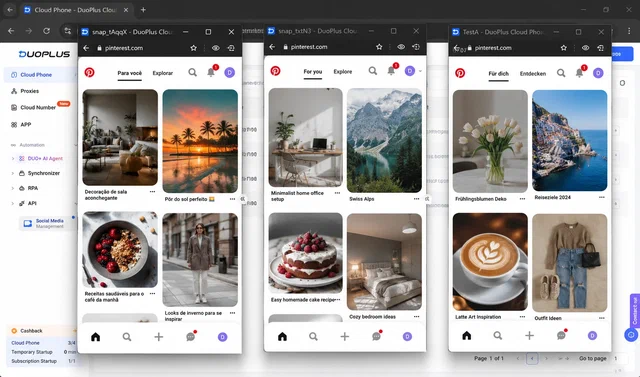
Cloud phones jaise DuoPlus aapko per account ek dedicated cloud Android instance dete hain, jo provider ke data center me chal raha hota hai aur aapke apne browser se access hota hai. Har cloud phone ke apne device identifiers, build fingerprint, Play Services state, app sandbox, aur ADB shell hote hain — ek self-contained mobile environment, har doosre cloud phone se isolated jo aapke dashboard me hai. Pinterest ka mobile app uska primary UX hai, aur mobile API surface desktop browser se spoof karna mushkil hai, isliye specifically Pinterest ke liye ek cloud phone aksar stronger environment hota hai.
DuoPlus is guide ke through worked example ke roop me used cloud-phone service hai. Har profile ek full Android instance hai apne device identifiers aur Play Services state ke saath, aur dashboard unhe ek tabbed view me group karta hai taaki ek operator kai Pinterest sessions side by side khol kar rakh sake bina accounts ke beech state bleed kiye. DuoPlus ne is workflow ka apna walkthrough publish kiya hai jo cloud-phone side ko zyada detail me cover karta hai.
Antidetect browsers jaise Multilogin , Octo Browser , aur Kameleo aapko fully configurable fingerprints ke saath isolated desktop browser profiles dete hain. Yeh typically cloud phones se per profile sasta hote hain, high profile counts par chalane me faster hote hain, aur ek workstation se volume me manage karna easier hota hai. Desktop-first Pinterest workflow ke liye yeh ek valid alternative hain, aur kai operators mixed fleets chalate hain: high-value brand aur client accounts ke liye cloud phones, long tail ke liye antidetect browsers.
Dono options same problem ko same tarah se solve karte hain: har Pinterest account apne sealed environment me live karta hai jo kisi bhi doosre ke saath fingerprint share nahi karta.
Layer 2: Network identity (mobile proxies)
Yeh woh part hai jise zyaadatar multi-account guides afterthought ki tarah treat karte hain, aur yahi aksar decide karta hai ki multi-account setup month two ke past stable rahega ya nahi.
Har Pinterest account ko apna IP chahiye, aur us IP ko account ki lifetime ke liye ek real consumer ki tarah dikhna chahiye. Teen proxy types exist karte hain, aur in me se sirf ek pattern me fit hota hai.
| Proxy type | Pinterest kya dekhta hai | Best for | Pinterest multi accounts ke liye kyu kaam nahi karta |
|---|---|---|---|
| Datacenter | Commercial ASN (DigitalOcean, OVH, AWS, etc.) | Throwaway tasks | Commercial ASN ek known risk signal hai; nayi accounts par reduced distribution ya extra verification ho sakta hai |
| Rotating residential | Har kuch minutes me alag city | Anonymous web access | Frequent geo jumps credential stuffing jaise dikh sakte hain aur commonly verification ya reduced distribution trigger karte hain |
| Mobile (4G/5G) | Carrier ASN, CGNAT pool | Multi-accounting; competitor, content, aur trend research; koi bhi long-term account operation | Kaam karta hai: ek hi IP type jo real consumer mobile signal se match karta hai |
Datacenter proxies trap hain. Yeh sasta hain, fast hain, aur in ke peeche ka ASN widely commercial recognize hota hai. Operators frequently report karte hain ki known datacenter ranges se signups ko day one se weaker distribution aur zyada verification prompts dikhte hain, chahe account kabhi explicitly ban na ho. Typical visible result hai reduced reach, throttled Pin distribution, aur accounts jo time ke saath stabilize karne me struggle karte hain.
Rotating residential proxies safer feel karte hain lekin Pinterest ka geo model break karte hain. Zyaadatar residential pools har kuch minutes ya har request me IPs rotate karte hain . Pinterest ke point of view se, ek single account ek hi ghante me New York, fir Seattle, fir Miami, fir Los Angeles se login karta dikh sakta hai. Yeh pattern account-hopping geos ki tarah read hota hai — credential-stuffing ya stolen-account signal — aur commonly verification, account freezes, ya reduced distribution trigger karta hai.
Mobile-carrier IPs wahi hain jis par stack built hai. Ek mobile proxy aapke traffic ko ek real SIM card par ek real cellular carrier ke through route karta hai. IP carrier ke mobile address pool se aata hai — wahi pool jis se real mobile subscribers ko IPs assign hote hain. Iske multi-account work ke liye teen bade consequences hote hain:
- Carrier ASN, commercial ASN nahi. Pinterest IP ke peeche ke ASN ko fingerprint karta hai. Ek T-Mobile ya Vodafone ASN consumer ki tarah read hota hai; ek DigitalOcean ya OVH ASN nahi. ASN difference akela early distribution aur verification risk ko affect kar sakta hai.
- Working session ke liye IP stickiness. Aapki SIM ke saath hold kiya hua mobile IP tabhi rotate hota hai jab aap ask karte ho (ya jab carrier reassign karta hai, typically har several hours-days me). Pinterest per account ek stable geo dekhta hai, jo time ke saath ek normal consumer mobile session jaisa lagta hai.
- Carrier-grade consistency. Kyunki mobile-carrier address space wahi hai jahan se real subscribers ko IPs assign hote hain, is se route hota traffic normal mobile-traffic baseline ke andar baith jata hai. Pinterest accounts ko total signals set par evaluate karta hai (IP, ASN, device, locale, behavior), aur ek clean carrier-IP environment ek compliant account ke operate karne ke liye low-noise jagah hai.
iProxy.online usi pattern ke around build kiya gaya hai: ek Android device, ek SIM, per Pinterest account ek stable mobile proxy endpoint, on-demand ya scheduled rotation ke saath, jab tak aapko chahiye account ke liye dedicated. Aap ek Pinterest account ko hafton tak ek hi iProxy device, SIM, aur proxy endpoint ke saath tied rakh sakte ho, sessions ke dauran stable IP ke saath aur sirf deliberate rotations jab workflow mange. Agar aap network layer khud build karna chahte ho rent karne ke bajaye, hamari full setup guide ise end-to-end cover karti hai: 4G proxy network kaise banaye . Wider provider landscape ke liye, dekho trustworthy mobile-proxy providers ka overview .
Working pattern hai per Pinterest account ek cloud phone (ya ek antidetect profile), plus ek iProxy mobile proxy. Cloud phone fingerprint isolation handle karta hai; mobile proxy network identity handle karta hai. Har account ek consumer device ek consumer mobile IP par present karta hai, aapke portfolio ke accounts ke beech bina signal overlap ke.
An operations workflow for multi-account marketing teams
Ek perfect technical stack us account ko bachata nahi jo bot ki tarah behave karta ho. Operating side network side jitna hi matter karta hai, aur month one ke past zyaadatar multi-account losses operator habits se aate hain, proxy ya fingerprint failures se nahi.
Multiple Pinterest accounts ko day-to-day manage karne wali marketing team ya agency ke liye, jo workflow well travel karta hai woh aisa dikhta hai:
- Per account ek environment + ek mobile proxy, one-to-one map. Ek simple internal mapping rakho: account → cloud-phone profile (ya antidetect profile) → Android device → SIM → iProxy endpoint. Jo bhi next account uthata hai, woh sirf account name se uska poora kit dhoondh sake.
- Business Manager access ke liye, separation ke liye nahi. Har account ke andar, actual humans ke liye Business Manager roles use karo jinhe access chahiye — client staff, agency operators, freelancers. Yahi Business Manager exist karta hai, aur audit trail useful hota hai jab access hand karti hai.
- Ek account share karne wali distributed team ke liye, poori team ko ek shared mobile proxy ke through route karo. Pinterest ek single account par bahut alag physical locations se frequent logins ko risk pattern ki tarah read karta hai — chahe team legitimate ho. Aapki HQ country me ek shared mobile proxy Pinterest ko ek consistent IP deta hai chahe koi bhi marketer shift par ho. Per-account-per-proxy pattern ka inverse, lekin Case D ke liye sahi shape.
- Network identity ko account ke target market ke saath match karo. US-targeted account ek US SIM par, EU-targeted account ek local European SIM par, aur waise. Single account par mismatched country signal sabse common avoidable issue hai.
- Per account human pacing par operate karo. Hours me phailaye gaye thode saves dus minute ke saves burst se hamesha behtar hote hain. Jahan aapko din me kaam phailana ho, Pinterest ka native scheduler ya ek approved Pinterest partner tool use karo — unauthorized automation nahi.
- Accounts ke across creatives vary karo. Apne portfolio ke across byte-identical images mat push karo. Pinterest ek duplicate Pin ko same image plus same destination URL ki tarah define karta hai, aur exact duplicates distribution me de-prioritized hote hain; operators commonly report karte hain ki accounts ke across visually near-duplicate Pins bhi cluster ho sakte hain. Har account ko apne creative variants se fayda hota hai.
- New accounts ko warm up karo. New Pinterest account ke pehle 7–14 din: niche-aligned content publish karo, apne space se real Pins save karo, kuch credible accounts ko follow karo. Domain verification, Shopping, ya paid placements account ke saath real activity hone ke baad add karo.
- Har account ke declared niche me raho. Pinterest ka recommendation engine per account ek interest profile sikhta hai; ek hi account par unrelated verticals ke across pinning karne se distribution dilute ho sakti hai.
- Rotation aggression se zyada IP stability. Kisi planned rotation se pehle per account same device, SIM, aur iProxy endpoint at least ek-do hafte rakhho; public IP kabhi-kabhi carrier side se rotate ho sakta hai aur yeh normal mobile behavior hai. Constant operator-driven rotation anomalous read ho sakta hai; long stable sessions with deliberate scheduled changes nahi.
- Handover aur offboarding. Jab koi client offboard hota hai, uska kit deliberately retire ya repurpose karo: IP rotate karo, SIM swap karo jab appropriate ho, aur cloud-phone profile reset karo bajaye same environment ko ek nayi account ko handle karne ke. Har account apne footprint par shuru ho.
Bade portfolios ke liye, operational side khud ek light engineering project ban jata hai — centralized rotation control, per-device traffic visibility, API-driven IP changes. Ek iProxy dashboard un signals ko per device consolidate karta hai, jo account count badhne par sabse bada operational saving banta hai.
Hardware and setup notes for an account portfolio
Conceptual stack clear hone ke baad, practical questions ban jate hain: kaunsa Android phone, kaunsi SIM, kaunsa carrier, aur is kit ko second job banaye bina kaise chalu rakhe. Production me Pinterest fleets chalane wale operators se kuch notes:
- Environment layer ek free choice hai — cloud phone, antidetect browser, ya ek real Android phone sab kaam karte hain jab properly configure ho (per-account isolation, consistent geo, locale, fingerprint, profiles ke beech koi cookie bleed nahi). Cloud phones aur antidetect portfolios ke liye practical default hain; ek real phone ek single-account hand-operated workflow ke liye fit hai.
- Supported Android models pick karo, jo sabse sasta ho woh nahi. Bina OEM updates aur aggressive battery management wala burner phone proxy connection ko random tarah drop karega aur time ke saath fingerprints burn karta rahega. Long-term stable behavior wale models ke liye hamari recommended devices list dekho.
- SIM ko account ke target market ke saath match karo. Ek US-targeted Pinterest account ek Vietnamese SIM par geo-mismatch signal hai chahe baki stack kitna bhi sahi ho. Aapke target country ke carriers, jo active data plans consumer pricing par hain, wahi sahi choice hain.
- Capacity ke liye plan karo. Pinterest zyada bandwidth consume nahi karta, lekin video Pins, video uploads, aur Shopping catalog refreshes usage me spike kar sakte hain. Ek consumer “unlimited” data plan usually enough hota hai; commercial-grade SIMs ki zaroorat nahi.
- Power aur heat matter karte hain. Proxy ki tarah 24/7 chalne wale Android phone ko power management aur thermal margin chahiye. Aggressive OEM battery savers proxy app ko silently kill kar sakte hain. Full setup — lithium-ion chemistry, 80% charge caps, smart-plug duty cycles, Android 9–17 ke across OS settings — hamari mobile-proxy phone battery longevity guide me hai.
Meaningful Pinterest portfolio chalane wali teams ke liye, boring operational work (power, monitoring, replacement cycles) usually “channel kaam karta hai” aur “hum firefighting karte rehte hain” ke beech ka difference hai. Ek managed dashboard ke through centralized control un sab kaam ko ek single pane me compress kar deta hai.
What it costs and how the stack scales
Ek clean Pinterest multi-account setup ke liye realistic price floor:
- Environment layer. DuoPlus ya comparable provider par ek cloud-phone seat environment layer ka higher-cost side hai; up-to-date per-account figure ke liye provider ki current pricing page check karo. Ek antidetect-browser profile typically per profile sasta hota hai aur per operator seat zyada concurrent profiles support karta hai. Mixed setups common hain: top tier ke liye cloud phones, baki ke liye antidetect.
- Network layer. iProxy.online se ek dedicated mobile proxy $6/month per Android device se shuru hota hai. Yeh ek Pinterest account per device hai, full IP rotation control aur plan tier ke andar unlimited bandwidth ke saath.
- Hardware (optional, sirf jab aap apne phones host kar rahe ho). Ek budget Android phone good condition me $100–150 ke around shuru hota hai aur 24/7 operation me lagbhag 3–5 saal chalta hai agar properly cool kiya jaye (battery replace karke 3–5 saal aur). Kai operators capacity iProxy resellers se rent karte hain ya phones ko shared facilities me co-locate karte hain hardware step ko skip karne ke liye.
Economics per account linearly scale karta hai. Koi per-seat platform fee nahi jo growth ko punish kare. Yahi device-per-account model ka structural advantage hai: no shared infrastructure, no rotation-pool contention, no platform-side rate limits jo poore portfolio ko throttle karein kyunki ek account noisy ho gaya.
Agar channel stack se zyada produce karta hai, scale up karna mechanical hai. Agar nahi, per-account cost itni kam hai ki unprofitable accounts ko close karna bhi mechanical hai. Yahi position aap chahte ho.
Putting it together
Agar aap zero se shuru kar rahe ho, cleanest path hai per Pinterest account ek cloud phone environment layer ke liye aur per account ek iProxy mobile proxy network layer ke liye. Cleanly set up, ek-do hafton tak warmed up, human pace par operated — yeh configuration compliant accounts ke liye unnecessary verification, clustering, aur restriction risk ko kam karne ke liye designed hai, jo wahi metric hai jo matter karta hai jab aap channel par depend karte ho.
Implement karne ka order:
- Apna case is guide me upar wale diagnostic me dhoondho (“Which case are you actually in?”). Right Pinterest tool (account linking, Business Manager Employee ya Partner role, ya per-business BMs) aur dedicated infrastructure chahiye ya nahi, dono us case se follow karte hain.
- Environment layer pick karo (top accounts ke liye cloud phone, baki ke liye antidetect) aur per account ek isolated profile provision karo.
- iProxy par per Pinterest account ek dedicated mobile proxy provision karo, carrier ko har account ke target market ke saath match karte hue.
- Kisi bhi commercial action se pehle har account ko 7–14 din warm up karo.
- IP rotation ko manual ya scheduled par lock karo, random kabhi nahi.
- Human pacing par operate karo, creatives vary karo, har account ke declared niche ke andar raho.
Aapke portfolio me har account fir apne signals par stand karta hai, aur portfolio accounts add karke scale hota hai, shared stack par zyada weight daal kar nahi.