Key Takeaway: Managing multiple Pinterest accounts breaks down into two separate problems people often confuse. Business Manager solves access: logins, roles, billing — for accounts that are openly related (one operator’s portfolio, agency staff inside one client’s account, a parent company and its in-house teams). Infrastructure (one isolated environment plus one dedicated mobile proxy per account) solves operational footprint: the IP, browser fingerprint, and geo signal each account presents to Pinterest’s distribution. Whether you need both layers, one, or neither depends on your actual situation — five cases below cover almost everyone.
Plenty of fully legitimate operators end up managing multiple Pinterest accounts . A marketing agency manages a Pinterest presence per client. A consumer-goods company runs one Pinterest account per regional market, or one per audience segment, or one per product line. A solo SMM operator keeps a business account and a personal one, sometimes a third for a side niche. The moment you go past one Pinterest profile, the question of how each account presents itself to Pinterest becomes the operational problem worth thinking about.
This guide is about that operational layer: what Pinterest’s quality systems care about, what Pinterest’s own tools (account linking, Business Manager) already solve for you, and where dedicated infrastructure — a per-account environment plus a per-account mobile-network identity — picks up.
What this is, and isn’t
Running multiple Pinterest accounts is not about concealing that they share an owner. Pinterest’s Community Guidelines prohibit operating multiple accounts “with the purpose of manipulating the Pinterest platform” and creating “accounts en masse” — not the existence of multiple accounts run by one operator. An agency openly running Pinterest accounts for several clients is doing exactly what Pinterest’s Business Terms of Service anticipate: “If you open an account on behalf of a company, organisation or other entity… you promise that you are authorised to grant all permissions and licences provided in these Terms.” A company running a US-targeted and a Europe-targeted Pinterest account is presenting two distinct audiences a localized experience.
Your set of accounts may openly use the same corporate domain on their contact email addresses, the same payment entity, the same registered company name. What needs to be independent is each account’s operational footprint — its device, network, behavior, language, and geo — so Pinterest’s quality systems evaluate each account on its own activity instead of letting signals from one bleed into another.
The rest of this guide is about how to set that footprint up.
Why Pinterest is still worth the operational work in 2026
Pinterest is a visual discovery engine, not a feed-based social network. Users type intent (“boho wedding centerpieces”, “small balcony garden ideas”, “preppy fall outfits”) and Pinterest serves Pins from its search index — much closer to how Google works than to how Instagram works. A Pin you publish today can keep surfacing in search results for months or years; every save and click strengthens its ranking. Pinterest is also one of the few major platforms that still lets Pins link out to your own site, where Instagram, TikTok, and Facebook deliberately suppress outbound traffic.
The numbers behind that long-tail behavior are still strong in 2026: Pinterest reported 631 million monthly active users in Q1 2026, up 11% year-over-year , on $1.008 billion of quarterly revenue (+18% YoY). The audience matters less than the economics: because Pins earn clicks through organic search ranking rather than paid impressions, a single well-targeted Pin can quietly send qualified buyers to a product page for years at zero marginal cost. A Meta or TikTok ad stops bringing visitors the second you pause the budget; a Pin keeps working. That cost-per-buyer gap is why affiliate marketers, niche-content sites, and Shopify operators keep treating Pinterest as a serious acquisition channel — and why they want to scale across multiple accounts.
And because that same channel attracts both legitimate multi-account operators and spam farms, Pinterest enforces account hygiene the way Meta does.
Which case are you actually in?
Most “Pinterest multi-account” questions come down to one of five situations. Find yours below — the answers differ, and several of the cases don’t actually need multi-accounts at all.
Case A — Multiple independent businesses (your portfolio, or an agency’s clients)
You are here if: you operate several distinct brands, or you’re an agency working with multiple clients.
Multi-accounts? Yes — one Pinterest account per real business.
Right Pinterest tool: each business runs its own Business Manager. Pinterest’s docs are explicit that child accounts in a parent/child BM hierarchy must be ones you own; client-owned accounts stay on the client’s BM, and your agency staff requests Partner access to each. Don’t pile clients into one agency BM.
Proxies? Yes. Pinterest clusters accounts by IP and device fingerprint when evaluating ban-propagation risk. Five clients running from your one office workstation are five accounts visibly co-operated; a problem on one drags the rest. One isolated environment plus one mobile proxy per account keeps them independent at the network layer.
Case B — Same business, multiple country markets (US + UK + DE…)
You are here if: you run one brand and want a presence in several country markets.
Multi-accounts? Often no. Pinterest’s ads support country, region, metro, postal-code targeting natively — one account, multiple campaigns, each pointed at one market. Pinterest’s community guidance generally favors one account with regional boards in local language over splitting.
Reasons to actually split into per-country accounts:
- you want a fully native account identity per market (local profile name, language, locally-managed content)
- each market has its own team and approval process
Proxies? Only if you split. Each per-country account needs a country-matched mobile IP to look natively local to Pinterest’s distribution. A .de account run from a US office IP is a geo-mismatch signal that suppresses reach even when the content is right.
Case C — Same business, multiple niches, categories, or strategies (and A/B testing)
You are here if: one brand owns content for different audiences — fashion + food, B2C product + B2B services — or you want to A/B-test two distinct content strategies side by side.
Multi-accounts? Split only when audiences don’t overlap. Pinterest’s algorithm rewards niche focus; an account that pins across unrelated verticals dilutes the recommendation signal for all of them. The test: would the same Pinterest user follow both? Yes → one account, separate boards. No → separate accounts.
A/B testing strategies specifically: two accounts running parallel strategies in the same niche are visibly co-operated if they share IP, device, and fingerprint. What you measure becomes partly the strategy and partly Pinterest deciding the two accounts are duplicates of each other. Clean separation is what makes the A/B comparison meaningful.
Proxies? Yes when you split. Same logic as Case A — independent accounts need independent operational footprints, or Pinterest treats them as one.
Case D — One account, distributed team (3 marketers in 3 countries, 24/7 shifts)
You are here if: one Pinterest account, several people logging in from different physical locations.
Multi-accounts? No. This is the case people most often build wrong. You don’t need multiple accounts — you need Business Manager Employee roles. Each marketer gets their own login into the one account, with 2FA, no shared password. That is exactly what BM Employee was built for.
Gotcha: Pinterest tracks IP and device per session. Operators consistently report that accounts logged into from very different locations in short order get extra verification prompts and reduced trust — Pinterest’s own two-factor authentication tooling exists for that exact risk surface. Three logins per day from three countries is that pattern, even though it’s the same legitimate team.
Proxies? Yes — and notably, not for multi-accounting. Route the whole team through one shared mobile proxy in the account’s audience country (typically your HQ country, but for a fully-remote team it’s whatever country the account is meant to look like it operates from). Pinterest sees one consistent IP regardless of where the marketers physically sit; the 24/7 coverage stays invisible.
The principle to remember: the proxy represents the account’s identity, not any individual operator’s location. A solo nomad running one account uses one stable proxy in the account’s market, not a fresh proxy in each country they fly to. A distributed team of four sharing one account still uses one shared proxy — not four. An agency running ten accounts with a remote staff of four uses ten proxies (one per account); each staffer routes through proxy #K when working on account #K, regardless of where they’re physically logged in from.
What Pinterest objects to is drift: the same account’s logins jumping between three countries in 48 hours. That looks identical to a compromised credential or a session-passing scheme, and Pinterest’s 2FA / restriction tooling exists for that exact pattern. Stable proxy per account, route everyone through it. That is the whole rule.
Case E — Geo-targeted market and competitor research
You are here if: you want to research a market you don’t physically operate from — keyword trends, what’s working for competitors, what real buyers in that country are pinning, searching, and being shown.
Multi-accounts? No. This isn’t a multi-account scenario. You can browse logged-out or from one of your existing accounts; what changes is where Pinterest thinks the viewer is.
What’s actually covered here. The full spectrum of legitimate human-pace research: manually browsing competitor boards, saving inspiration pins, keyword-researching a niche, gauging product-category demand, watching trending pins evolve, having Claude or another browser assistant summarize boards and pins as you browse. What is not covered — and what would push you out of this case and into something Pinterest’s ToS objects to — is bulk programmatic extraction: headless bots, Python scrapers, anything that needs aggressive IP rotation to dodge rate limits. Manual and AI-assisted browsing is just viewing public content, which Pinterest permits; industrial-scale scraping is outside the scope of this guide.
Pinterest serves country-specific feeds: search ranking, trending pins, suggested boards, and ad inventory all shift with the viewer’s geo signal. From your home IP in Lisbon, Pinterest shows you Portuguese results; the US shoppers your client targets see something entirely different, and you can’t keyword-research or competitor-watch a feed you can’t see.
Proxies? Yes — and this is the case where the proxy alone does the job, without environment isolation. A country-matched mobile IP makes you look like a real phone user in that market, and Pinterest serves the market’s feed accordingly. Datacenter IPs get filtered out of personalized feeds; rotating residential pools jump cities every few minutes, which breaks the “consistent shopper in market X” view you want.
Unlike the multi-account cases above, this is the cleanest use case for temporary mobile-proxy access — you don’t need a 1:1 dedicated IP per account, just a stable mobile endpoint in each target country for the duration of the research.
A note on account creation
Pinterest’s risk systems are most aggressive during the first hours of a new account’s life. Multiple new business accounts created from the same office IP and the same browser get flagged hard — sometimes restricted before they’ve published a Pin. This is the case for every multi-account path above (A, B-2, C-2) where you’re spinning up the accounts yourself.
The principle is the same as the rest of this guide: each account should be created from the operating environment and mobile IP it will live on — not from your office workstation with a plan to migrate it later. Treat the proxy as part of the account’s identity from minute one. Creating multiple business accounts is legitimate (agency onboarding a new client, multi-brand company opening a regional presence, content operator launching a new niche line); what attracts Pinterest’s review is creating them from a footprint that looks identical to a spam farm’s.
Once you’ve found your case, the rest of this guide covers the operational layer in detail — what Pinterest’s quality systems actually read, and how the environment-and-network stack maps onto each case.
Pinterest’s official tools — and where they stop
Before bringing in any infrastructure, it’s worth being precise about what Pinterest’s own tools actually cover. They handle a real part of the problem; they just don’t handle all of it.
Account linking and switching. Pinterest’s account-linking feature lets you link “up to four accounts” under one login and switch between them. That’s enough for one person managing a personal account plus a small set of business accounts. It is designed around the assumption that the same person, on the same device, on the same network is operating those linked accounts — Pinterest is fully aware they share a session.
Business Manager. Pinterest’s Business Manager is “a suite of features that help advertisers and agencies collaborate across accounts or brands.” It lets you “access multiple ad accounts from a single login,” assign Employee, Partner, and Publisher roles, and manage multi-party access without shared passwords. Crucially, the Partner role is explicit that “Partners are external businesses, such as agencies or clients… Partners have their own business accounts.” Business Manager is the right answer for an agency that needs to operate inside a client’s Pinterest account, or for a company that wants to give staff and external partners scoped access.
Where they stop. Linking and Business Manager handle access, billing, and role assignment for accounts that are meant to be openly related — same operator, agency-and-client, parent company and its in-house teams. Pinterest is designed around that usage and doesn’t penalize it. What these tools don’t do is give each account its own clean operating surface: a fresh fingerprint, a stable network identity, a geo signal that matches the account’s intended market. Two BM-linked accounts run from one office IP and one browser are correctly linked from a permissions standpoint, but to Pinterest’s distribution systems they’re indistinguishable at the network and device layer. That’s a problem the moment the accounts should function as independent distribution surfaces — different clients, different markets, different audiences.
The result is a clean two-step model:
| Your case | Right Pinterest tool | Dedicated infra? |
|---|---|---|
| A. Multiple independent businesses or agency-with-clients | Each business’s own Business Manager; agency staff requests Partner access into each client BM | Yes — one environment + one mobile proxy per account |
| B-1. One business, multi-country, single-account approach | One account, country-targeted ad campaigns and regional boards | No — one account, one normal operating environment |
| B-2. One business, multi-country, separate account per market | All per-country accounts under one Business Manager | Yes — country-matched mobile IP per account |
| C-1. One business, related niches with overlapping audiences | One account, separate boards per niche | No |
| C-2. One business, mutually-exclusive niches or A/B-testing strategies | Separate accounts under one Business Manager | Yes — one environment + one mobile proxy per account |
| D. One account, distributed team across countries | Business Manager Employee roles, no shared password | Yes — one shared mobile proxy for the whole team |
| E. Geo-targeted market and competitor research (manual or AI-assisted) | One account or logged-out browsing, from the target-country IP | Yes — country-matched mobile IP for the market (no 1:1 dedicated-per-account needed) |
| Solo: personal + business profile, same household IP | Account linking (up to 4) | No |
Past the access-and-billing layer, what’s left is the operational layer: per-account environment, per-account network identity, per-market geo. That’s the part infrastructure carries.
What “clean operational separation” actually means
Pinterest’s quality systems read a per-account profile across a handful of signal categories. None of these are exotic; they’re what any large platform looks at.
Network identity. The IP an account logs in from, the ASN behind that IP, the rough geo. Two accounts that log in from the same IP are visibly co-located to Pinterest. Datacenter ASNs (DigitalOcean, OVH, AWS, large hosting providers) are widely understood by operators to be a different signal class from consumer-carrier ASNs; accounts signed up through commercial IP ranges are commonly reported to see weaker initial distribution and more verification prompts.
Device and browser fingerprint. Canvas, WebGL, audio context, installed fonts, screen resolution, timezone, language headers, browser extensions, passive OS-level signals , dozens of other attributes. Two accounts with identical fingerprints look like one device.
Behavioral patterns. Posting cadence, login times, mouse-vs-trackpad signals, paste-vs-type detection, scroll behavior. Scripted account farms betray themselves here long before any IP or fingerprint check.
Geo and metadata consistency. IP from one country, language header from another, payment card from a third, mobile carrier from a fourth. Even when each individual signal is “clean,” inconsistencies across them can register as a warning sign on a single account.
Account history. Old accounts with steady, on-niche activity get more rope than brand-new accounts that immediately pull commercial actions (claim a domain, enable Shopping, run an ad, paste an affiliate link). Adding commercial features to an empty profile is what attracts extra review on any platform.
The operating rule Each Pinterest account needs its own internally consistent identity: device, fingerprint, IP, carrier, language, timezone, and payment all consistent with that one account’s declared market, language, and brand. Cross-account, the rule is independence: no shared IP, no shared fingerprint, no shared behavior profile.
The two-layer model: environment + network
Operationally the cleanest mental model is: one Pinterest account = one isolated environment + one dedicated mobile network endpoint. Two surfaces, two solutions.
Layer 1: Environment isolation
The environment layer handles everything Pinterest sees about your device: fingerprint, OS, app version, screen, fonts, mobile carrier code, push tokens. Two approaches dominate in 2026.
Cloud phones like DuoPlus give you a dedicated cloud Android instance per account, running in the provider’s data center and accessed through your own browser. Each cloud phone has its own device identifiers, build fingerprint, Play Services state, app sandbox, and ADB shell — a self-contained mobile environment, isolated from every other cloud phone in your dashboard. Pinterest’s mobile app is its primary UX, and the mobile API surface is harder to spoof from a desktop browser, so for Pinterest specifically a cloud phone is often the stronger environment.
Any reputable cloud-phone provider follows the same pattern — each profile is a full Android instance with its own device identifiers and Play Services state, and the dashboard lets an operator keep several Pinterest sessions open side by side without state bleeding between accounts. The screenshots in this guide use DuoPlus as one concrete example, but Geelark, Nstbrowser cloud phones, MoreLogin cloud phone, and similar services slot into the same role.
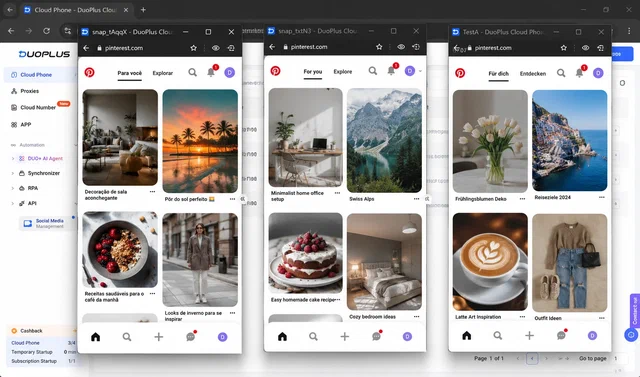
Antidetect browsers like Multilogin , Octo Browser , and Kameleo give you isolated desktop browser profiles with fully spoofable fingerprints. They are typically cheaper per profile than cloud phones, faster to operate at high profile counts, and easier to manage in volume from one workstation. For a desktop-first Pinterest workflow they are a valid alternative, and many operators run mixed fleets: cloud phones for high-value brand and client accounts, antidetect browsers for the long tail.
Both options solve the same problem the same way: each Pinterest account lives in its own sealed environment that shares no fingerprint with any other.
Layer 2: Network identity (mobile proxies)
This is the part most multi-account guides treat as an afterthought, and it is what most often decides whether a multi-account setup stays stable past month two.
Every Pinterest account needs its own IP, and that IP needs to look like a real consumer for the lifetime of the account. Three proxy types exist, and only one of them fits the pattern.
| Proxy type | What Pinterest sees | Best for | Why it tends to fail for Pinterest multi accounts |
|---|---|---|---|
| Datacenter | Commercial ASN (DigitalOcean, OVH, AWS, etc.) | Throwaway tasks | Commercial ASN is a known risk signal; new accounts can see reduced distribution or extra verification |
| Rotating residential | Different city every few minutes | Anonymous web access | Frequent geo jumps can read like credential stuffing and commonly trigger verification or reduced distribution |
| Mobile (4G/5G) | Carrier ASN, CGNAT pool | Multi-accounting; Competitor, content, and trend research; Any long-term account operation | Works: the only IP type that matches a real consumer mobile signal |
Datacenter proxies are the trap. They are cheap, they are fast, and the ASN behind them is widely recognized as commercial. Operators frequently report that signups from known datacenter ranges see weaker distribution and more verification prompts from day one, even when the account is never explicitly banned. The typical visible result is reduced reach, throttled Pin distribution, and accounts that struggle to stabilize over time.
Rotating residential proxies feel safer but break Pinterest’s geo model. Most residential pools rotate IPs every few minutes or every request . From Pinterest’s point of view, a single account can appear to be logging in from New York, then Seattle, then Miami, then Los Angeles, all in the same hour. That pattern reads as account-hopping geos — a credential-stuffing or stolen-account signal — and commonly triggers verification, account freezes, or reduced distribution.
Mobile-carrier IPs are what the stack is built on. A mobile proxy routes your traffic through a real SIM card on a real cellular carrier. The IP comes from the carrier’s mobile address pool — the same pool that real mobile subscribers are assigned from. That has three large consequences for multi-account work:
- Carrier ASN, not commercial ASN. Pinterest fingerprints the ASN behind the IP. A T-Mobile or Vodafone ASN reads like a consumer; a DigitalOcean or OVH ASN does not. The ASN difference alone can affect early distribution and verification risk.
- IP stickiness for the working session. A mobile IP held by your SIM rotates only when you ask it to (or when the carrier reassigns, typically every several hours-days). Pinterest sees a stable geo per account, which is what a normal consumer mobile session looks like over time.
- Carrier-grade consistency. Because mobile-carrier address space is what real subscribers are assigned from, traffic routed through it sits inside the normal mobile-traffic baseline. Pinterest evaluates accounts on the total set of signals (IP, ASN, device, locale, behavior), and a clean carrier-IP environment is a low-noise place for a compliant account to operate.
iProxy.online is built around that pattern: one Android device, one SIM, one stable mobile proxy endpoint per Pinterest account, with on-demand or scheduled rotation, dedicated to the account for as long as you need. You can keep a Pinterest account tied to the same iProxy device, SIM, and proxy endpoint for weeks at a time, with a stable IP during sessions and only deliberate rotations when the workflow calls for one. If you want to build the network layer yourself rather than rent it, our full setup guide covers it end-to-end: how to make a 4G proxy network . For the wider provider landscape, see our overview of trustworthy mobile-proxy providers .
The working pattern is one cloud phone (or one antidetect profile), plus one iProxy mobile proxy per Pinterest account. The cloud phone handles fingerprint isolation; the mobile proxy handles network identity. Each account presents one consumer device on one consumer mobile IP, with no signal overlap between accounts in your portfolio.
An operations workflow for multi-account marketing teams
A perfect technical stack does not save an account that behaves like a bot. The operating side matters as much as the network side, and most multi-account losses past month one come from operator habits, not from proxy or fingerprint failures.
For a marketing team or agency managing multiple Pinterest accounts day to day, the workflow that travels well looks like this:
- One environment + one mobile proxy per account, mapped one-to-one. Keep a simple internal mapping: account → cloud-phone profile (or antidetect profile) → Android device → SIM → iProxy endpoint. Whoever picks up the account next should be able to find every part of its kit from the account name alone.
- Business Manager for access, not for separation. Inside each account, use Business Manager roles for the actual humans who need access — client staff, agency operators, freelancers. That’s what Business Manager exists for, and the audit trail is useful when access changes hands.
- For a distributed team sharing one account, route the whole team through one shared mobile proxy. Pinterest reads frequent logins from very different physical locations on a single account as a risk pattern — even when the team is legitimate. A shared mobile proxy in your HQ country gives Pinterest one consistent IP regardless of which marketer is on shift. The inverse of the per-account-per-proxy pattern, but the right shape for Case D.
- Match the network identity to the account’s target market. A US-targeted account on a US SIM, an EU-targeted account on a local European SIM, and so on. Mismatched country signal on a single account is the most common avoidable issue.
- Operate at human pacing, per account. A handful of saves spread across hours beats a burst of saves in ten minutes every time. Where you need to spread work over the day, use Pinterest’s native scheduler or an approved Pinterest partner tool — not unauthorized automation.
- Vary creatives across accounts. Don’t push byte-identical images across your portfolio. Pinterest defines a duplicate Pin as the same image plus the same destination URL, and exact duplicates are de-prioritized in distribution; operators commonly report that visually near-duplicate Pins across accounts also cluster together. Each account benefits from its own creative variants.
- Warm up new accounts. First 7–14 days of a new Pinterest account: publish niche-aligned content, save real Pins from your space, follow a few credible accounts. Add domain verification, Shopping, or paid placements after the account has real activity to back them.
- Stay in each account’s declared niche. Pinterest’s recommendation engine learns an interest profile per account; pinning across unrelated verticals on the same account can dilute distribution across the lot.
- IP stability over rotation aggression. Keep the same device, SIM, and iProxy endpoint per account for at least a couple of weeks before any planned rotation; the public IP may occasionally rotate on the carrier side and that is normal mobile behavior. Constant operator-driven rotation can read as anomalous; long stable sessions with deliberate scheduled changes do not.
- Handover and offboarding. When a client offboards, retire or repurpose its kit deliberately: rotate the IP, swap the SIM if appropriate, and reset the cloud-phone profile rather than handing the same environment to a new account. Each account starts on its own footprint.
For larger portfolios, the operational side becomes its own light engineering project — centralized rotation control, per-device traffic visibility, API-driven IP changes. An iProxy dashboard consolidates those signals per device, which becomes the single biggest operational saving as the account count grows.
Hardware and setup notes for an account portfolio
Once the conceptual stack is clear, the practical questions become: which Android phone, which SIM, which carrier, and how do you keep the kit running without it becoming a second job. A few notes from operators running Pinterest fleets in production:
- Environment layer is a free choice — cloud phone, antidetect browser, or a real Android phone all work when configured properly (per-account isolation, consistent geo, locale, fingerprint, no cookie bleed between profiles). Cloud phones and antidetect are the practical default for portfolios; a real phone fits a single-account hand-operated workflow.
- Pick supported Android models, not whatever is cheapest. A burner phone with no OEM updates and aggressive battery management will drop the proxy connection at random and burn through fingerprints over time. See our recommended devices list for models with stable long-term behavior.
- Match the SIM to the account’s target market. A US-targeted Pinterest account on a Vietnamese SIM is a geo-mismatch signal regardless of how the rest of the stack looks. Carriers in your target country, with active data plans on consumer pricing, are the only correct choice.
- Plan for capacity. Pinterest does not consume much bandwidth, but video Pins, video uploads, and Shopping catalog refreshes can spike usage. A consumer “unlimited” data plan is usually enough; commercial-grade SIMs are not required.
- Power and heat matter. A 24/7 Android phone running as a proxy needs power management and thermal margin. Aggressive OEM battery savers can silently kill the proxy app. The full setup — lithium-ion chemistry, 80% charge caps, smart-plug duty cycles, OS settings across Android 9–17 — is in our mobile-proxy phone battery longevity guide .
For teams running a meaningful Pinterest portfolio, the boring operational work (power, monitoring, replacement cycles) is usually the difference between “the channel works” and “we keep firefighting.” Centralized control via a managed dashboard compresses most of that work into a single pane of glass.
What it costs and how the stack scales
A realistic price floor for a clean Pinterest multi-account setup:
- Environment layer. A cloud-phone seat at DuoPlus or a comparable provider is the higher-cost side of the environment layer; check the provider’s current pricing page for the up-to-date per-account figure. An antidetect-browser profile is typically cheaper per profile and supports more concurrent profiles per operator seat. Mixed setups are common: cloud phones for the top tier, antidetect for the rest.
- Network layer. A dedicated mobile proxy from iProxy.online starts at $6/month per Android device. That is one Pinterest account per device, with full IP rotation control and unlimited bandwidth within the plan tier.
- Hardware (optional, only if hosting your own phones). A budget Android phone in good condition starts around $100–150 and lasts roughly 3–5 years of 24/7 operation if cooled properly (just replace the battery and run 3–5 more years). Many operators rent capacity from iProxy resellers or co-locate phones in shared facilities to skip the hardware step entirely.
The economics scale linearly per account. There is no per-seat platform fee that punishes growth. That is the structural advantage of the device-per-account model: no shared infrastructure, no rotation-pool contention, no platform-side rate limits that throttle the whole portfolio because one account got noisy.
If the channel produces more than the stack costs, scaling up is mechanical. If it doesn’t, the cost per account is low enough that closing the unprofitable accounts is also mechanical. That is the position you want to be in.
Putting it together
If you are starting from zero, the cleanest path is one cloud phone per Pinterest account for the environment layer and one iProxy mobile proxy per account for the network layer. Set up cleanly, warmed up for a couple of weeks, operated at human pace, this configuration is designed to reduce unnecessary verification, clustering, and restriction risk for compliant accounts — which is the metric that matters when you depend on the channel.
The order to implement:
- Find your case in the diagnostic earlier in this guide (“Which case are you actually in?”). The right Pinterest tool (account linking, Business Manager Employee or Partner role, or per-business BMs) and whether you need dedicated infrastructure both follow from that case.
- Pick the environment layer (cloud phone for top accounts, antidetect for the rest) and provision one isolated profile per account.
- Provision one dedicated mobile proxy per Pinterest account on iProxy, with the carrier matching each account’s target market.
- Warm up each account for 7–14 days before any commercial action.
- Lock IP rotation to manual or scheduled, never random.
- Operate at human pacing, vary creatives, stay inside each account’s declared niche.
Each account in your portfolio then stands on its own signals, and the portfolio scales by adding accounts, not by piling more weight onto a shared stack.