Key Takeaway: Multilogin brings Android cloud phones and browser profiles into one platform for managing social media work. Test the environment your task actually needs, then check usage allowances, billing terms, and automation requirements before choosing a plan.
What is Multilogin?
Multilogin is a cloud phone and browser-profile platform for social media marketers, agencies, creators, and e-commerce teams. It provides separate workspaces for mobile apps and websites, so a team can organize authorized client accounts without using one shared browser session for every task.
The distinction between those two workspaces matters. Posting through an Android app and using a website’s reporting dashboard are different jobs. A browser profile may suit the second task, while the first needs an Android environment. Buying a larger profile allowance does not, by itself, answer which environment is appropriate.
One of Multilogin’s early beta testers was iProxy.online founder Evgeny #SmoguVse. This September 2026 update reviews the platform’s documented capabilities and the supplied interface screenshots. It is not a new performance benchmark or a claim that the cloud-phone product has been tested against every social platform. This review is published by iProxy.online, a mobile-proxy provider; the proxy section explains where our service may be relevant.
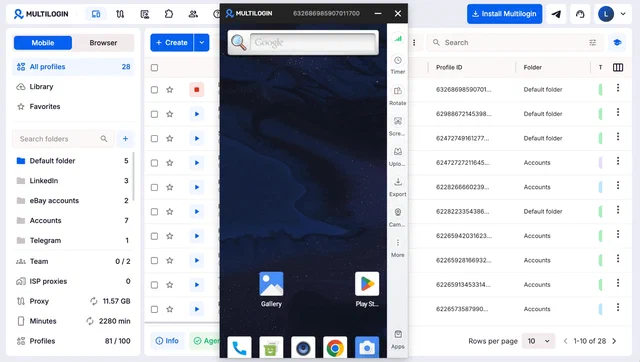
The dashboard screenshot illustrates the distinction clearly: Mobile and Browser are separate tabs, and proxy traffic, minutes, and profile counts have separate indicators. Treat those as different resources when planning a subscription. The balances visible in the screenshot belong to that example account; they are not the allowances of the Free plan.
Android cloud phones and browser profiles
According to Multilogin’s cloud-phone explanation, a mobile profile provides an isolated Android environment running remotely. App data, login history, and device identifiers persist while that cloud phone exists. The documentation explicitly distinguishes this from a physical handset attached to a server.
For web-first work, Multilogin also offers browser profiles. These separate browser sessions and can be used for tasks such as Reddit or YouTube web workflows. The useful question is whether your specific task needs the native app or the website, rather than whether one profile type is universally better.
| Decision | Android cloud phone | Browser profile |
|---|---|---|
| Where the work happens | Inside Android apps | Inside websites |
| What to check first | App compatibility and required Android version | Website workflow and browser-tool compatibility |
| Usage to budget | Cloud-phone minutes and proxy traffic | Profile allowance and proxy traffic |
| Automation route | Mobile tools such as ADB or Appium | Browser tools such as Playwright or Selenium |
For an agency, a practical starting point is a task inventory: publishing, answering messages, checking analytics, and preparing reports. Mark which tasks genuinely require a mobile app. That exercise can prevent assigning a cloud phone to a reporting workflow that only needs a browser, or choosing a browser profile for an app-only publishing feature.
Keep operational ownership clear as well. Record which client owns an account, who may access it, and who handles recovery. A separate environment helps organize work, but it does not replace authorization from the account owner or the platform’s rules for account management.
Before choosing: Start from the required app or website, then choose the profile type. Confirm your intended use complies with that platform’s account and automation policies.
Proxies, location, and the role of iProxy.online
Multilogin includes proxy traffic allowances in its plans. That can simplify an initial trial because you do not have to assemble every part of the workflow separately. However, an included allowance is a quantity of traffic, not a promise of unlimited networking for every profile.
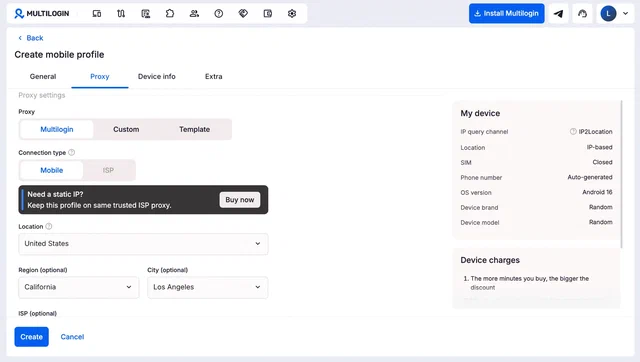
The supplied creation screenshot shows Multilogin, Custom, and Template proxy options, alongside location and device settings. These labels describe the configuration choices visible in that interface. They do not establish that every proxy product or protocol will work with every Android version; validate the combination you intend to use.
A cloud phone and a mobile proxy serve different purposes. The cloud phone provides the application environment. A mobile proxy provides a network connection through a mobile carrier. Using a cloud phone does not automatically mean that its outbound connection comes from your own SIM or that you control a physical handset.
Our recommendation is to try the included connection first when it meets your requirements. Consider an external mobile proxy when your project specifically needs a carrier connection you manage, an existing proxy subscription, or a network arrangement shared with other authorized tools. Do not add a separate service merely because a tutorial says every profile needs another purchase.
When evaluating networking, keep a small record of the selected location, connection type, and observed behavior in the intended app. Avoid changing several settings at once during a test: if both the device environment and the proxy change, it becomes harder to identify the cause of a login or connection problem.
For background on our offering, see proxies for social media workflows and account-management proxy options . These describe the networking component. They do not promise that a proxy will prevent account restrictions or make an otherwise prohibited workflow acceptable.
Free plan, paid pricing, and usage limits
As of September 17, 2026, Multilogin offers a Free plan with no time limit and no credit card required. The important conditions are the amount of included usage and what happens when the account remains inactive. A free subscription is not the same as continuous free cloud-phone operation.
| Plan detail | Free plan | Pro 10 |
|---|---|---|
| Regular monthly subscription | US$0 | US$11 |
| Profile allowance | Five total, including at most one mobile profile | Ten profiles |
| Included mobile minutes | 30, one-time bonus | 60 per month |
| Included proxy traffic | 200 MB, one-time bonus | 1 GB per month |
These figures come from Multilogin’s plan comparison, checked in September 2026. On Free, profiles are automatically deleted after seven days of complete inactivity. Start at least one profile within that interval if you need to retain them under the stated policy.
For team access, the same September 2026 plan comparison lists one team seat on Pro 10, two on Pro 20 and Pro 50, and unlimited team seats on Business 100 and Business 300. Team seats are separate from profile counts; check how many colleagues need access before choosing a subscription.
The pricing page also advertises annual billing and promotional offers. A smaller monthly equivalent can mean a larger upfront payment. Compare the billing period, amount due now, and renewal terms rather than copying the smallest number from a pricing card into your budget.
For a pilot, write down three separate estimates: how many profiles you need, how long the Android workflow runs, and how much traffic it consumes. Then compare each estimate with the plan allowance. A profile count that looks generous may still come with too few minutes for a long daily mobile session.
Do not assume that today’s one-time trial credits will replenish next month. Likewise, avoid treating a screenshot’s balance as a subscription entitlement. Use the plan documentation and checkout as the purchasing reference, and keep your own test notes for the workload you expect to repeat.
Budget check: Compare the subscription, any additional minutes or traffic, and any external proxy costs separately. Keep the same workload when comparing two options.
Automation: separate mobile and browser workflows
Multilogin supports automation, but the tool list needs context. Its automation FAQ lists Selenium, Puppeteer, and Playwright for browser profiles. For Android cloud phones, it identifies command-line tools, Android Debug Bridge (ADB), Appium, and supported AI-agent workflows.
Browser-profile API automation requires Pro 10 or a higher plan; it is not included in Free.
The ADB setup documentation limits that feature to paid plans and cloud phones running Android 11 or later. Android 10 does not support this connection. Check the selected Android version before designing a workflow around ADB; the availability of a cloud phone alone does not establish that this feature is included.
API requests and Postman are another part of the automation picture. The API overview covers managing profiles and related operations. A management API and a tool that interacts with buttons inside an Android app solve different problems. Select the interface that matches the operation you need.
For example, a reporting workflow might need to launch a browser profile and visit an authorized analytics page. An Android app test might need to open a screen and verify a visible result. Write those requirements separately before choosing a framework; a familiar browser tool is not automatically the right tool for native app interaction.
Start with one approved task and define its success condition. Keep an operator able to stop the process, avoid putting account credentials into shared logs, and confirm that retries will not publish the same item twice. These are evaluation practices we recommend, not claims that Multilogin automatically implements your application’s safeguards.
Strengths, limitations, and who should consider it
Multilogin is worth evaluating when your team needs both Android app environments and browser profiles. The two supplied screenshots show why that combination is useful to assess: one interface exposes the profile types, resource balances, and proxy settings needed to organize a pilot.
The practical strength is the opportunity to test mobile and web work under one subscription. The limitation is that the resources remain distinct. You still need to understand profile counts, phone minutes, proxy traffic, supported Android versions, and the tools available on your plan.
| Potential advantage | Tradeoff to check |
|---|---|
| Mobile and web profiles in one platform | Each task still needs the appropriate profile type |
| Included proxy traffic | Included quantities may not cover your workload |
| Free entry point | One-time credits and the inactivity-deletion rule limit the trial |
| Several automation interfaces | Mobile and browser integrations have different prerequisites |
Cloud phones also have hardware-related limits. The technical explanation linked above says they cannot directly send or receive SMS, make calls, or use eSIMs. Account-recovery requirements therefore deserve a separate check before you move an important workflow into a remote Android environment.
We would start with a small pilot for an agency handling authorized client accounts or a team testing its own mobile and web experiences. We would not choose the product solely because an old review promised anonymity. Profile separation and proxy configuration do not establish how a particular platform will assess an account.
If your work only needs a single browser session, or your app depends on physical-phone capabilities outside the documented feature set, write that constraint down before comparing subscriptions. A product can offer many features and still be the wrong fit for a narrow task. The pilot should answer that question before a larger commitment.
A practical evaluation checklist
Use this checklist to evaluate the updated platform without turning the trial into an open-ended migration. It is our suggested test process, not a claim that we ran these steps with your applications or measured a particular result.
- Choose one representative task. Pick an authorized account and a task you perform regularly. State whether it needs Android or the web, and what successful completion looks like.
- Record the starting conditions. Note the profile type, Android version if relevant, proxy choice, and available minutes and traffic. Keep account credentials out of shared notes.
- Complete the task manually first. Confirm that the required screens and actions work before adding automation. Record any behavior that requires operator intervention.
- Check continuity. Reopen the same profile and confirm that the state you expect to retain is present. Do not reset or delete the environment while evaluating persistence.
- Compare usage and cost. Look at the remaining balances after the task. Estimate your own recurring needs from that observation, and check the applicable paid-plan terms.
- Test the intended handoff. If a colleague will operate the workflow, verify the permissions and recovery process your team needs before moving client work into it.
Keep the outcome concrete: the workflow fits, it needs an adjustment, or it does not fit. A useful trial report names the exact task, records the unresolved limitation, and states the next decision. It does not need a broad claim about every social network or every type of account.
Multilogin’s getting-started video provides an additional introduction. Use the current documentation for plan conditions and feature prerequisites, since screenshots and videos can outlast the interface they show.