





IPv4 or IPv6 for Telegram: What's the Difference in Practice?

Evgeny Fomenko2026-04-20
 4
4 When you work with Telegram at a professional scale, the proxy question becomes unavoidable. Not the number of accounts, not the automation scenarios, not even the software itself - the real issue is which IP addresses those accounts use to access the network. Even the most feature-rich automation tool cannot deliver stability if the proxy infrastructure is built on random lists with duplicate addresses.
Telegram keeps tightening the way it regulates activity. Message-sending limits, spam blocks, frozen accounts - all of this is tied to the reputation and uniqueness of IP addresses. That makes the choice of protocol - IPv4 or IPv6 - a key decision. The difference is not merely technical; it directly affects how long accounts stay alive, how reliably automation runs, and what level of risk you have to budget for.
IPv4 and IPv6: what they are and why it matters for Telegram
Internet protocols are the foundation of network addressing. Every device, every server, and every Telegram account interacts through an IP address. The logic is simple: the more unique addresses available, the easier it is to build large-scale operations without overlap or blocks.
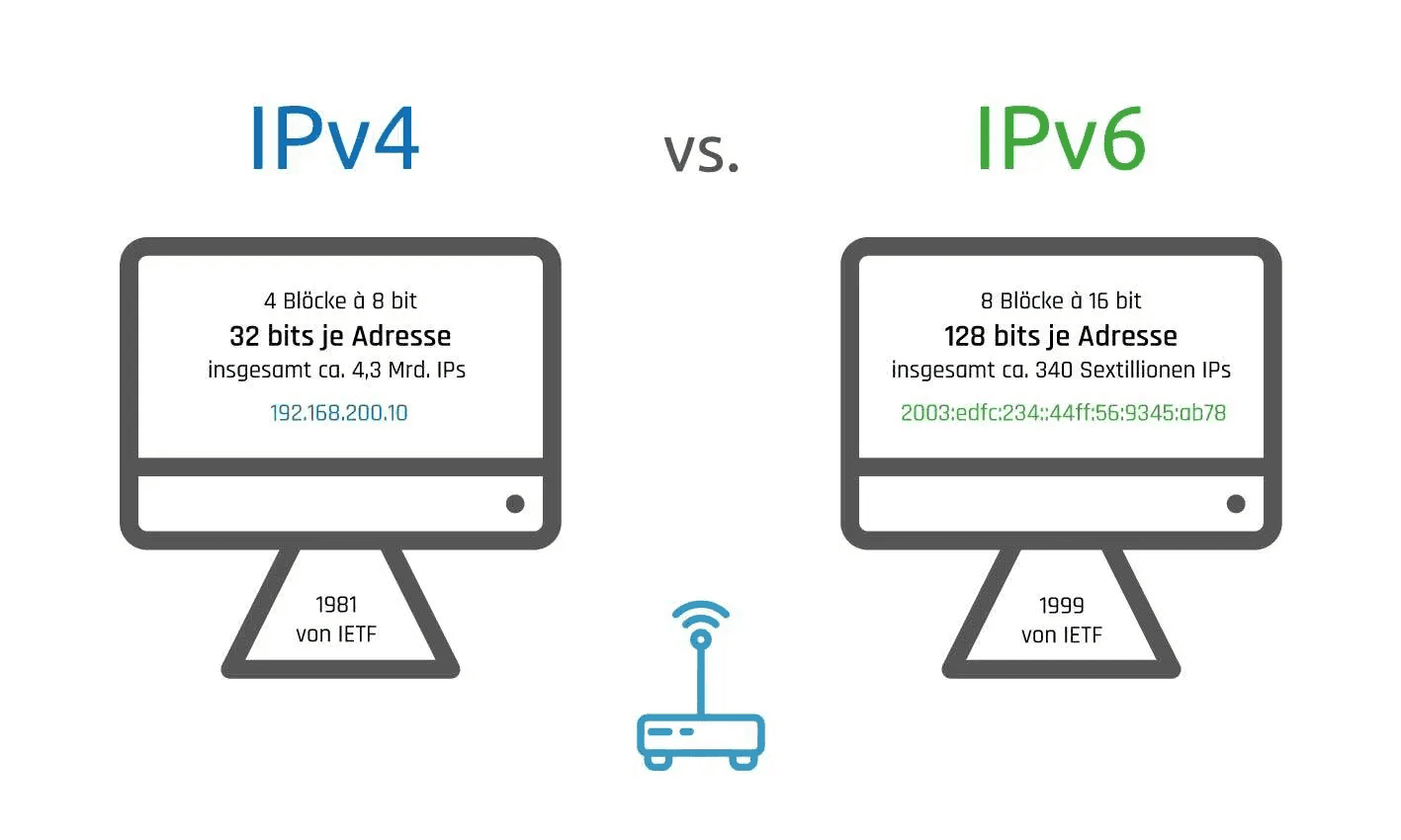
IPv4 is a 32-bit protocol that provides about 4.3 billion unique addresses. At first glance that sounds enormous, but given the number of devices in the world, this pool was effectively exhausted back in the early 2010s. That is why NAT is now used so widely - a technology that allows many devices to access the internet through one public IP. An ordinary user barely notices this, but for professional Telegram work it becomes a problem: NAT addresses are easy to identify, and their reputation degrades faster than that of clean IPs.
IPv6 emerged specifically because the world ran out of addresses. Its 128-bit address space provides roughly 3.4 × 10^38 unique addresses, which is more than enough with room to spare. Technically, IPv6 is built differently: it supports end-to-end connections without NAT, uses a simplified packet header for more efficient routing, and includes native IPsec support for encryption and authentication.
But the reality is that today's internet operates in a dual-stack model. There has been no full transition to IPv6, and none is expected in the foreseeable future. Both protocols coexist, so for Telegram the choice is not about which one is newer; it is about stability, availability, and predictability.
How the protocol choice affects Telegram work
Telegram supports IPv6, but only partially. The messenger's infrastructure is built on a dual-stack model: where IPv6 is available and stable, it is used, but not as a full replacement for IPv4. Some functions, especially those related to APIs and webhooks, still require IPv4.
From the standpoint of automation and account operations through software, the protocol choice produces several practical effects.
Less NAT means more stable connections. IPv6 allows you to work without network address translation, which reduces the number of failure points. For accounts, that means fewer session drops and more predictable behavior during long operations such as mailings, invites, and parsing.
Routing can also be more efficient. In theory, IPv6's simpler packet structure allows faster processing. In practice, real speed depends on the provider, the routes, and how well IPv6 is implemented on Telegram's end servers. There is no guaranteed speed boost, but in some cases latency really is lower.
Another important point is blocking and filtering. Censorship systems and anti-spam filters are generally better tuned for IPv4. IPv6 filtering is often less dense, which in some regions makes it possible to bypass restrictions that cut off IPv4 traffic. This is not a universal rule, but it is a real-world scenario that teams take into account when operating at scale.
However, there is another side to it. Not every proxy service offers high-quality IPv6. Many pools contain addresses with poor reputations or unstable response times. And for Telegram, not only IP uniqueness matters - response speed and connection stability are just as critical.
Why Telegram professionals choose IPv4 proxies
In the professional community, a clear consensus has formed: for Telegram work, IPv4 proxies are the more reliable choice. There are several reasons for that.
First, compatibility. Telegram Soft Expert and other automation tools have historically worked with IPv4, and this combination has been refined down to the smallest detail. For large-scale projects where predictable results matter, IPv4 remains the baseline standard.
Second, pools and uniqueness. High-quality IPv4 proxies provide clean addresses without NAT and allow strict account-to-IP binding. This makes it possible to build a transparent system: one account, one IP, minimal risk of overlap. With IPv6, that logic is harder to maintain because of routing specifics and the fact that many pools are still assembled on a leftover basis.
Third, the experience of tens of thousands of users. Telegram Expert, which is used for registration, mailings, invites, parsing, and analytics, has handled massive traffic volumes over the years. Experience shows that operational stability is directly tied to the quality of IPv4 proxies, their uniqueness, and the predictability of their response times.
Telegram Soft Expert: how to build proxy workflows without mistakes
When it comes to systematic Telegram operations, choosing a protocol alone is not enough. You need a tool that can work with proxies properly: add them, test them, analyze pools, and match IPs to specific scenarios. Telegram Soft Expert is a platform where proxy logic is built not as an extra feature, but as a foundation.
Adding proxies and initial checks
In Telegram Expert, proxy work starts with a dedicated management module. All uploaded proxies are displayed in a table with parameters such as IP or domain, port, login, password, protocol, version, response speed, and check status. The software works only with IPv4 - this is a deliberate limitation that eliminates compatibility issues.
Proxies are added manually through a form where you choose the protocol. Data is entered in the format ip:port:login:password. After loading, proxies can be sent for checking, deleted, or analyzed by response time. The table supports bulk actions: you can select several proxies or the entire list and start the check.
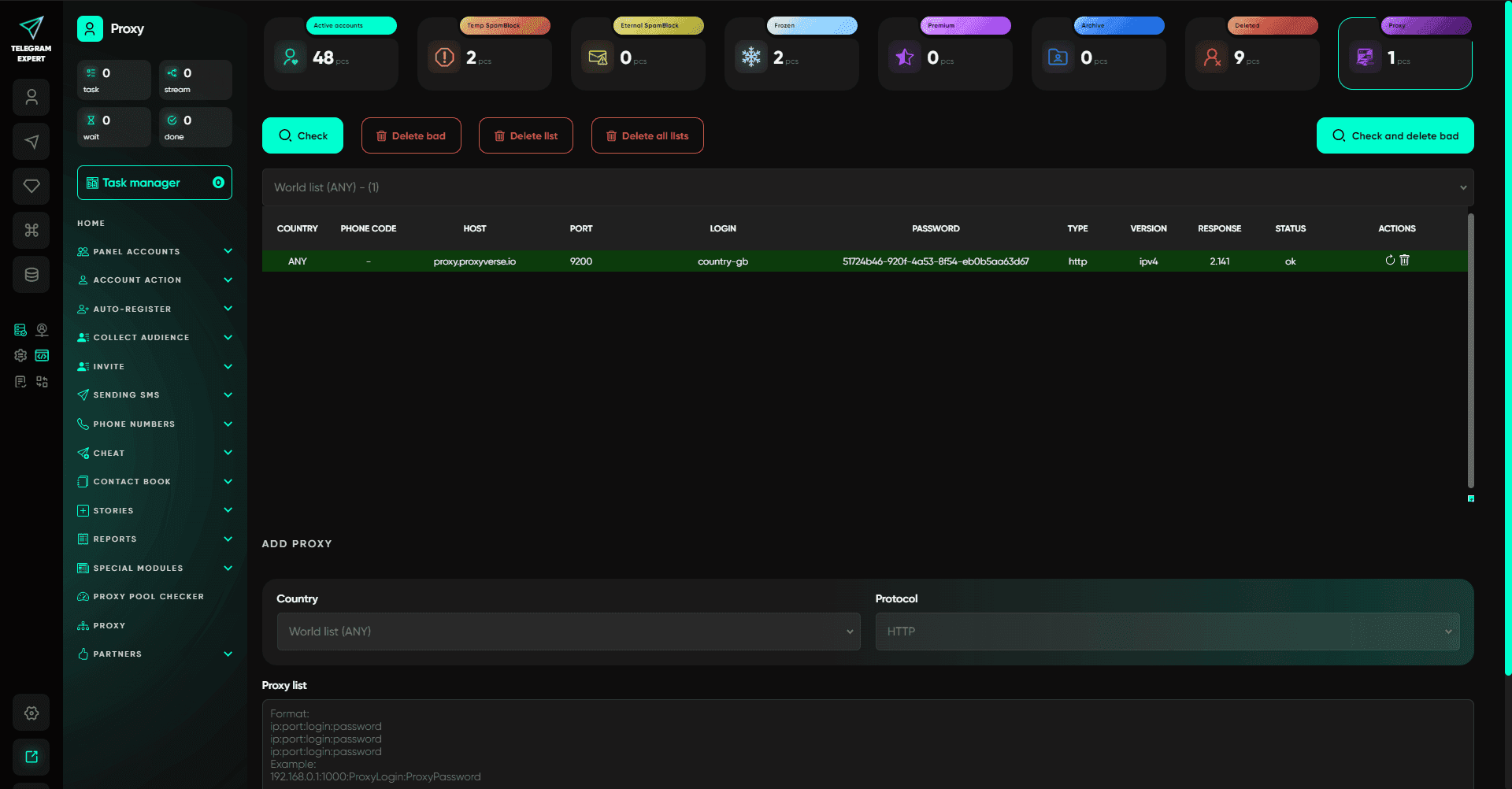
The check itself evaluates proxy availability and records the result as ok or bad. But there is an important nuance here. Proxies may fail to respond temporarily because of high ping or geographic specifics. In such cases, it makes sense to increase the response wait time to 45 seconds and allow up to 15 proxy-switch attempts. Quite often, proxies that look problematic at first turn out to be working after a repeat check.
Practical tip: if you are confident in your pool, test proxies not only in the checking module but also in a real task - for example, during a mass account ban check. Sometimes the checking module returns a connection error, while in actual work the proxies behave correctly.
Proxy pool checker: why IP uniqueness changes everything
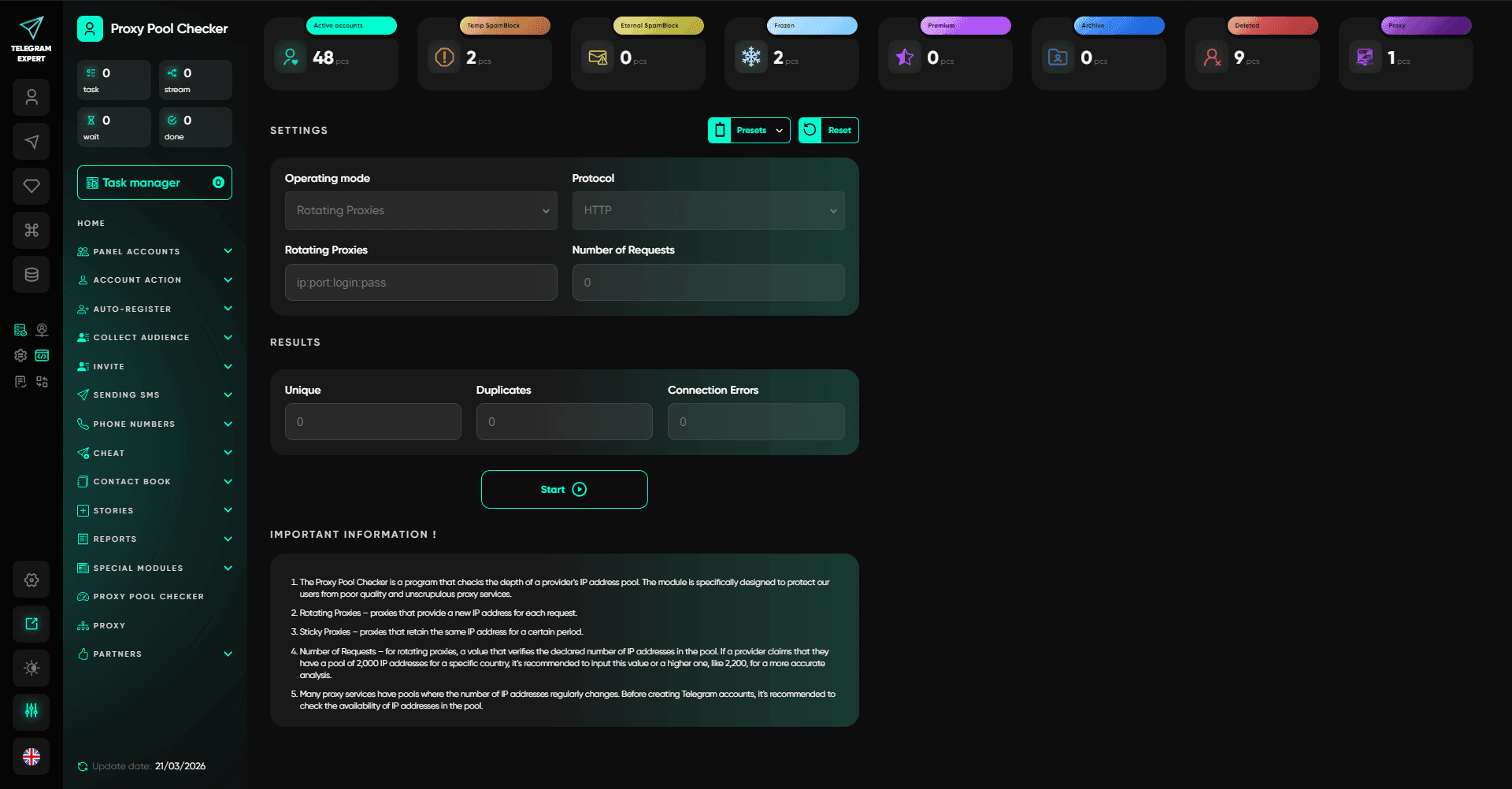
When proxies are counted not in dozens but in hundreds or thousands, the key issue is no longer whether each individual IP is simply "alive," but whether the addresses are unique within the pool. Telegram Expert has a dedicated module for this: the proxy pool checker.
It works differently depending on the proxy type.
For rotating proxies, you specify the protocol, the credentials, and the number of requests. The logic is simple: if a provider claims a pool of 100,000 IPs, then after making 100,000 requests the software should receive a number of unique addresses close to that. The result is shown in the statistics: number of unique IPs, number of repeats, and connection errors. Even with small volumes, this gives you an understanding of the pool's real capacity. For example, with 2,000 requests you might get 1,913 unique IPs and 87 repeats - and based on that alone you can decide whether the pool is suitable for large-scale work.
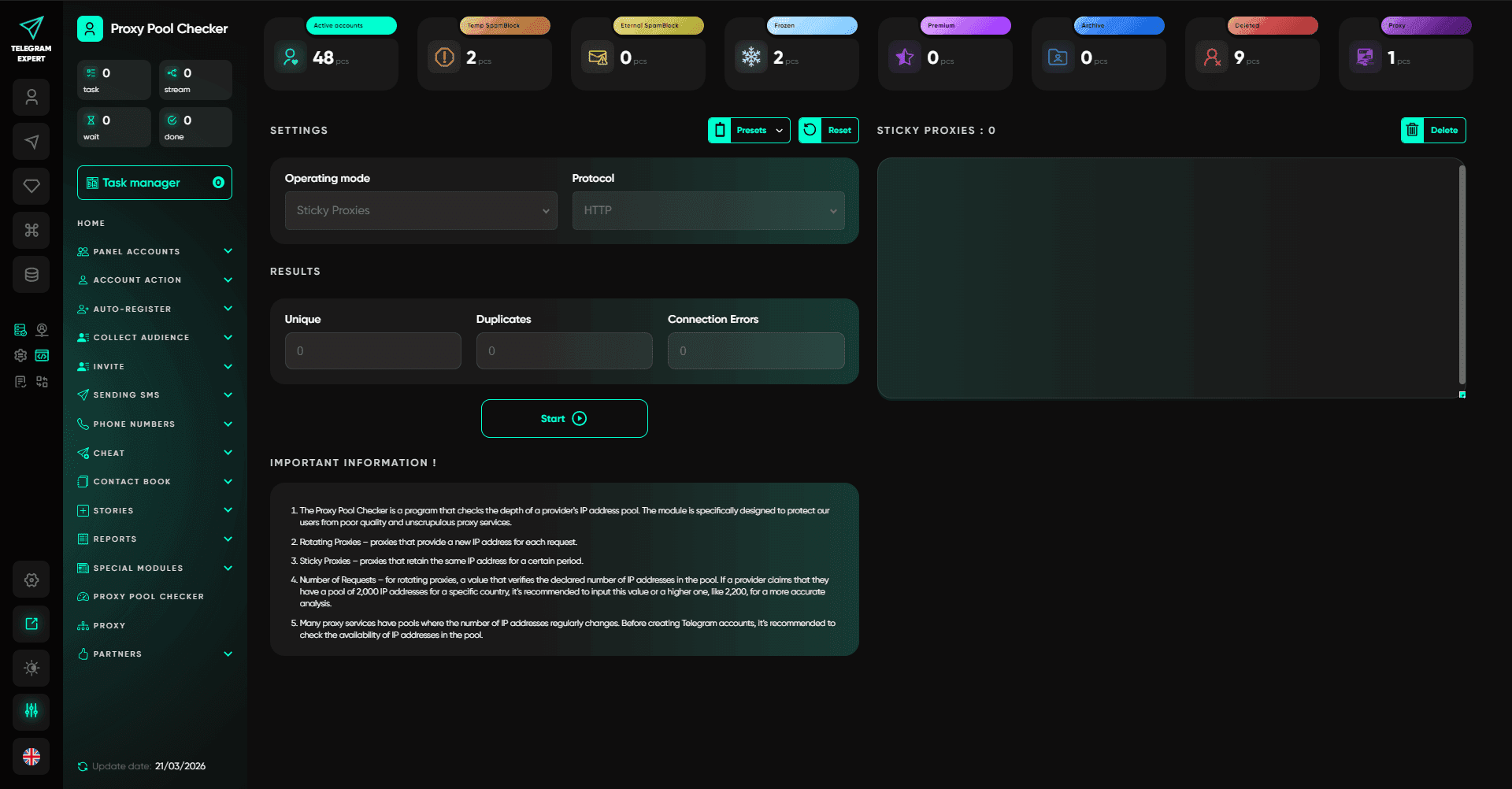
Sticky proxies are checked differently. The user uploads a list of proxies, one per line. The module's task is to verify whether the IPs overlap within that list. Ideally, one proxy equals one unique IP. If you upload 10,000 sticky proxies, the output should be 10,000 unique addresses. Any overlap means the real pool is small, and when working with a large number of accounts, IPs will start repeating and the risk of blocks will multiply.
Proxy working modes: flexibility without losing control
In Telegram Soft Expert, several proxy connection modes are available. These are not just toggles, but tools that let you adapt operations to different scenarios.
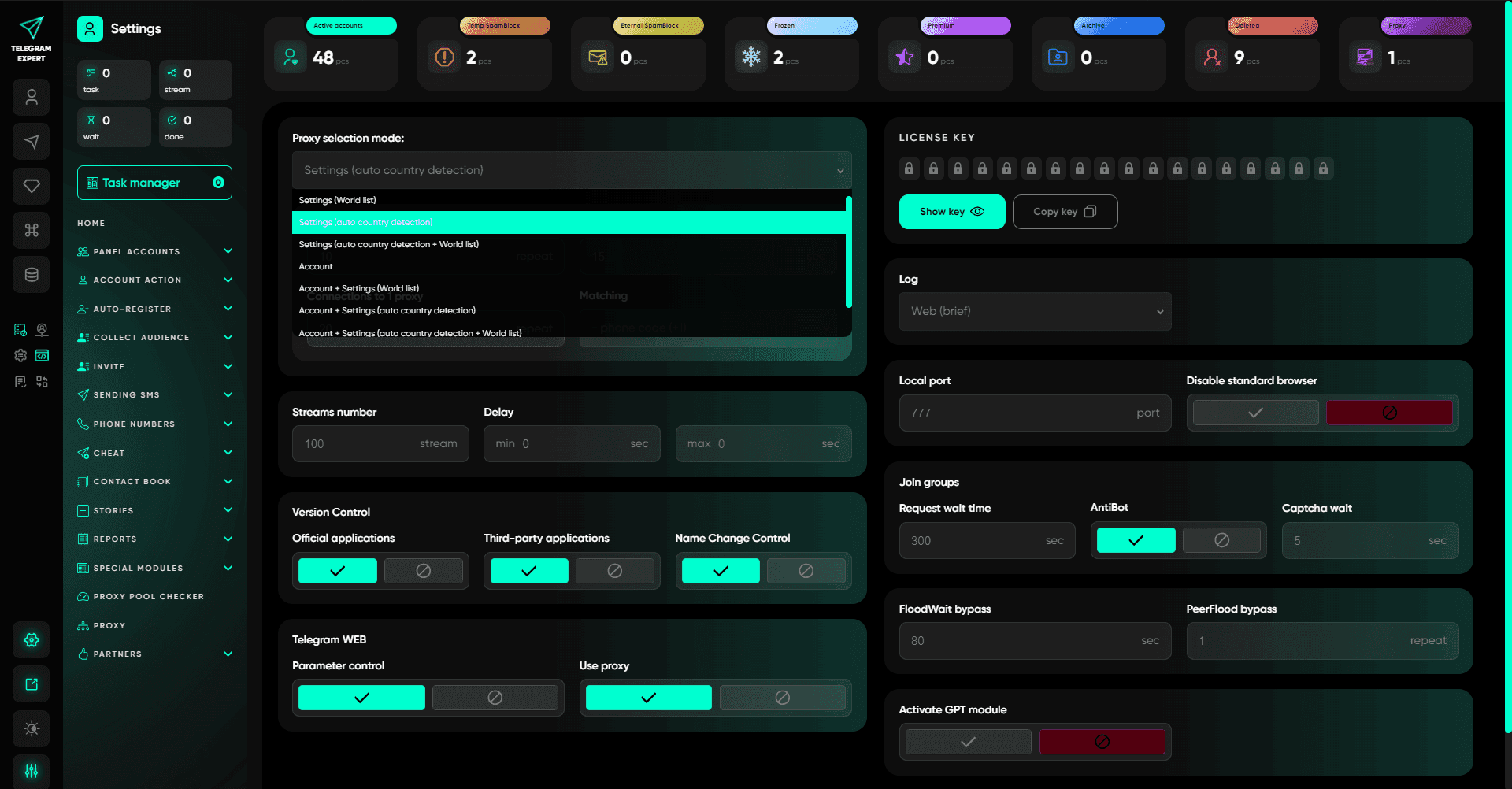
Strict mode (World list). Proxies are taken only from the preconfigured World list. If no suitable proxies are found, the task stops with an error. This mode is suitable when you use a single pool without binding proxies to accounts or geography.
Flexible mode with automatic country detection. The software determines the account's country (by a two-letter ISO code or by the phone number code) and tries to select a proxy from the corresponding list. If no proxies are found for that specific country, World list is used automatically. This is one of the most universal modes when working with mixed account bases from different regions.
Account-bound mode. Proxies are taken exclusively from the account's json file. If no proxy is present, an error occurs. This mode is used in scenarios where each account is strictly tied to its own IP and any substitution is unacceptable.
Combined modes. The software lets you build chains: first the proxy from the account, if none is available then automatic country detection, and if that is also unavailable then World list. This is the most flexible configuration, where the task does not stop just because proxies are missing in one specific source.
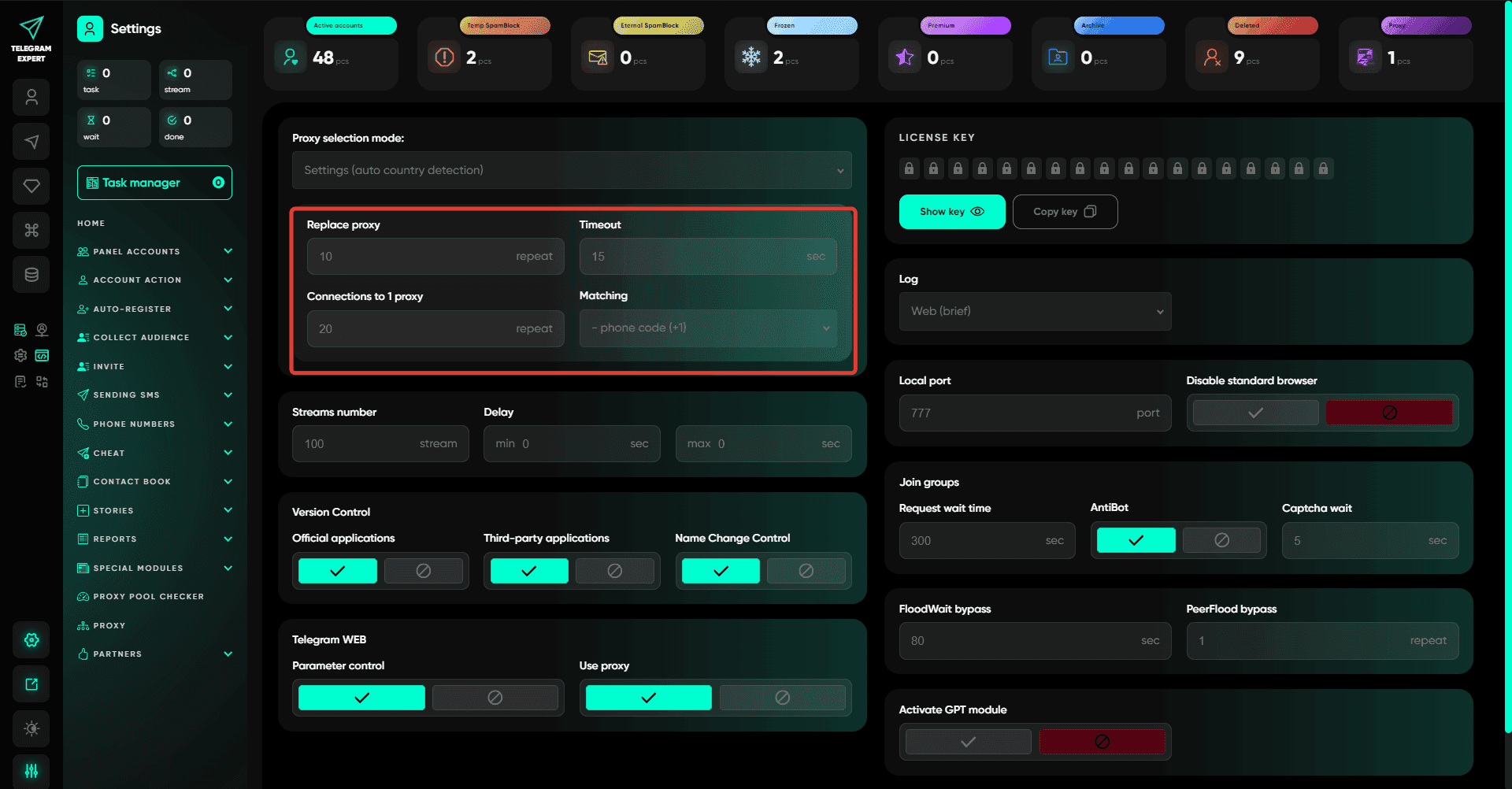
Fault-tolerance parameters are configured separately: the number of connection attempts for a single proxy, the response wait time (timeout), and the number of proxy replacement attempts from the list. With the right settings, even unstable pools can be adapted for working tasks. In practice, however, high-quality proxies with predictable response times require very little additional tuning.
What else Telegram Expert can do: a system for every scenario
Proxies are only the foundation. Telegram Expert is a full-scale platform in which each module solves a specific task, and together they provide complete control over any Telegram project.
-
Account panel - centralized management of hundreds of sessions. Mass ban checks, automatic folder distribution (active, spam block, frozen), batch changes to
-
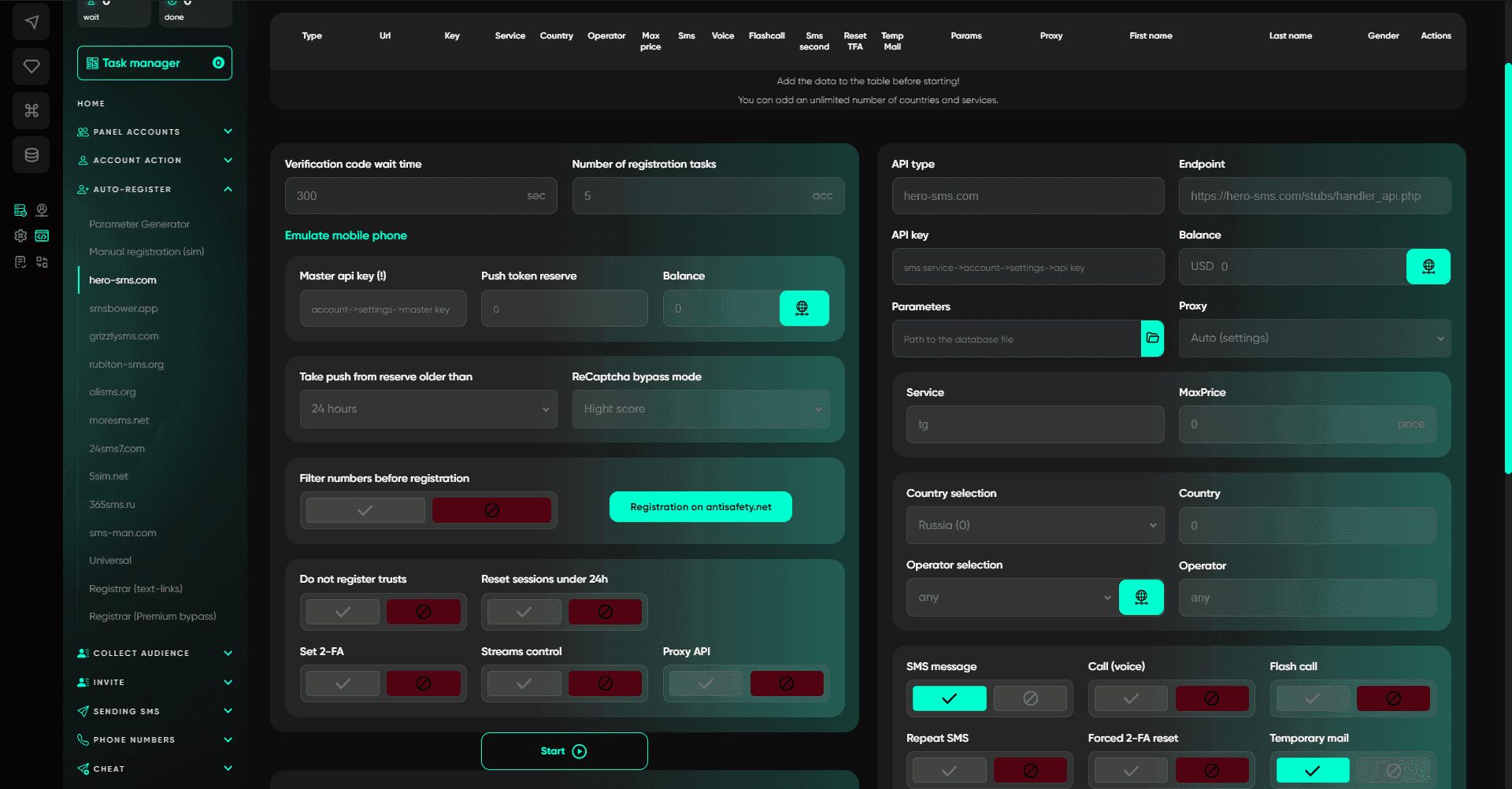
2FA, profiles, and sessions. Everything in just a few clicks. Auto-registration - removes the biggest pain point. Physical SIMs, 10+ SMS services, a parameter generator, mobile device emulation, and multi-geo support. Accounts are created reliably even in difficult regions.
-
Audience collection - parsing without limits. Global search, collection from comments, link verification, database cleanup from duplicates, and AI-based gender detection with accuracy above 75%. Build targeted lists quickly and without routine work.
-
Mailings and invites - communication at scale. Classic and GPT-powered mailings with personalization, auto-posting to chats, channel commenting, and an autoresponder. Inviting through the admin panel with bots is the safest method, without extra load on accounts.
-
Boosting and analytics - views, reactions, subscribers, and referrals. Mailing reports, a load calculator, and database merging. Everything you need to track effectiveness.
-
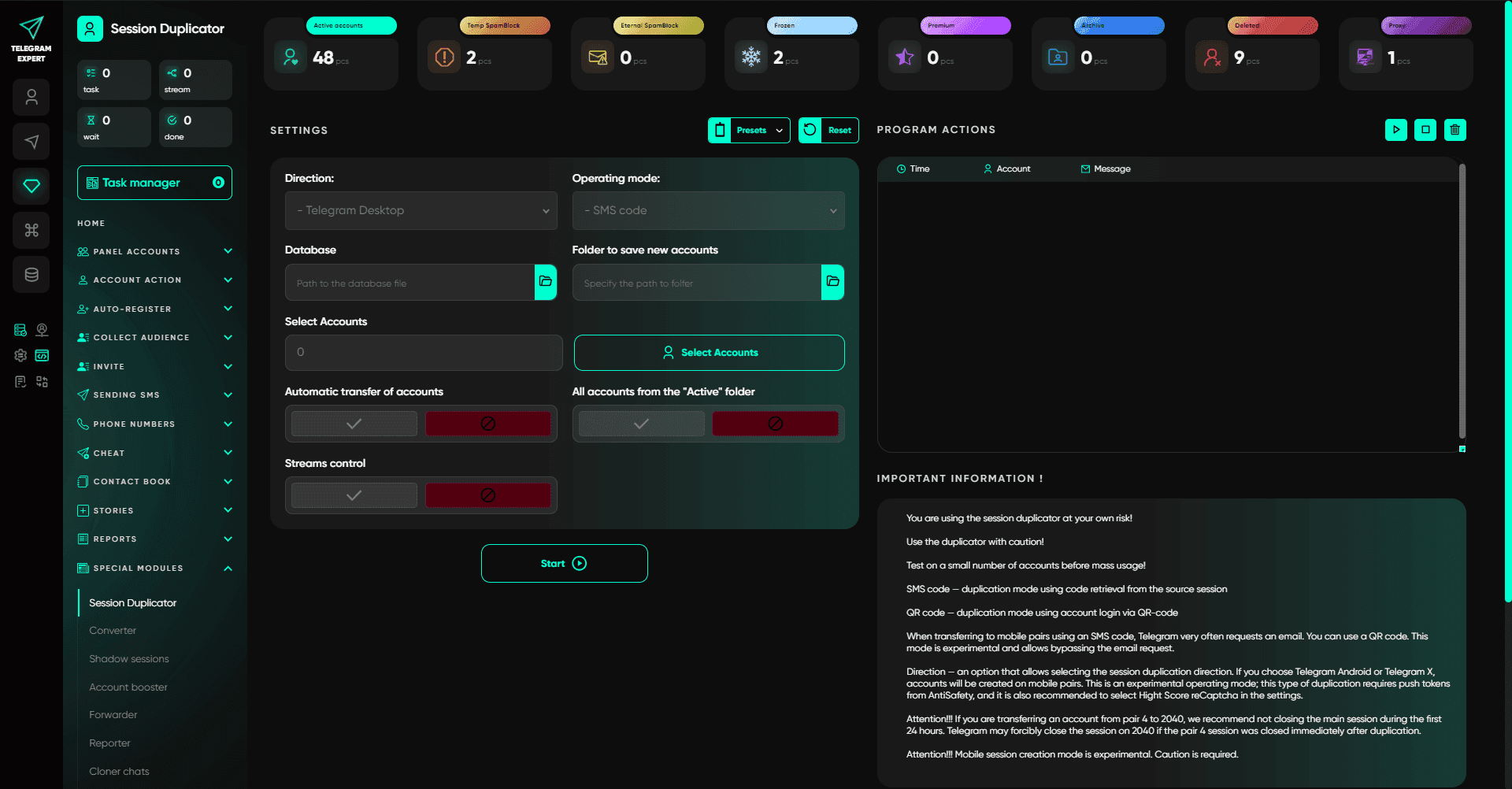
Special modules - a warm-up booster, session converter (Session ↔ TData), shadow sessions, a chat and channel cloner, and trigger-based content interception. Tools that turn Telegram into a manageable ecosystem.
Conclusion
Choosing between IPv4 and IPv6 for Telegram work means choosing between established practice and experimentation. IPv4 remains the standard around which automation is built, proxy pools are tested, and operating modes are refined. IPv6 can offer advantages in certain scenarios, especially when bypassing blocks, but it requires more careful provider selection and constant stability monitoring. In any case, the foundation of stable work is not the protocol by itself, but quality proxies and software that knows how to use them correctly. And that is exactly what Telegram Soft Expert.
- Best Mobile Proxy Providers [2026]

- How to Set Up Remote Change of IP Address Through iProxy.online?
- How to Make Money With Proxies [The Complete Guide]
- How to Increase the Proxy Speed: Detailed Guide
- Guide for setting up mobile proxies in iProxy.online
- All about .OVPN configs, UDP, HTTP/3, QUIQ support
- What is Wi-Fi Split? How does it help to increase the speed and reduce traffic consumption?
- Replace passive OS fingerprint in mobile proxies
- List of recommended phones for iProxy.online
- How to choose the right location of the server?
 Sign up with Google
- Best Mobile Proxy Providers [2026]
- How to Set Up Remote Change of IP Address Through iProxy.online?
- How to Make Money With Proxies [The Complete Guide]
- How to Increase the Proxy Speed: Detailed Guide
- Guide for setting up mobile proxies in iProxy.online
- All about .OVPN configs, UDP, HTTP/3, QUIQ support
- What is Wi-Fi Split? How does it help to increase the speed and reduce traffic consumption?
- Replace passive OS fingerprint in mobile proxies
- List of recommended phones for iProxy.online
- How to choose the right location of the server?


