





SOCKS5 vs HTTP Proxy: What Actually Differs and When It Matters

Ilya Rusalowski2026-03-30
 5
5 TL;DR: After the initial handshake, both SOCKS5 and HTTP CONNECT proxies are opaque TCP tunnels; neither reads your traffic, neither adds encryption. The one hard difference: SOCKS5 supports UDP (needed for WebRTC, HTTP/3, VoIP). HTTP CONNECT is faster to establish (1 RTT vs 3) and universally supported. For most web scraping and automation, either works equally well. Pick based on whether you actually need UDP, not on myths about "security" or "speed."
Search for "SOCKS5 vs HTTP proxy" and you'll find dozens of articles repeating the same oversimplified story: HTTP proxies work with web traffic, SOCKS5 works with everything, SOCKS5 is "more secure." Most of it is wrong, or at least misleading, because these articles treat "HTTP proxy" as one thing when it's actually two completely different technologies.
This article breaks down what's really going on at the protocol level, so you can make an informed choice instead of following cargo-cult advice.
Need private and fast mobile proxies?Make mobile proxies right now!
The distinction most articles miss
There are two types of proxy that go by the name "HTTP proxy":
1. Pure HTTP proxy (Layer 7 forwarding proxy)
This is a proxy that actually reads your HTTP traffic. The client sends a full HTTP request to the proxy, the proxy parses it, URL, headers, body, then makes its own request to the target server and relays the response back.
This type of proxy:
-
Operates entirely at the application layer (Layer 7)
-
Can read, modify, cache, and filter your requests
-
For plain HTTP: reads everything directly, no tricks needed
-
For HTTPS, does MITM (TLS interception): the proxy terminates your TLS session, decrypts the traffic, inspects it, then opens its own TLS connection to the target. This requires the proxy's CA certificate installed on the client machine. Without it, your browser screams certificate errors.
-
This is the standard model in corporate outbound proxies: Zscaler, Squid with ssl-bump, Blue Coat, Fortigate. It's how enterprises do DLP, compliance monitoring, and content filtering.
If you've ever worked in a corporate office and noticed that your browser's certificate for google.com was issued by your company's proxy, that's an L7 MITM proxy in action.
In the mobile proxy / scraping world, you won't encounter this type. It requires controlling the client's trust store, which makes no sense for a proxy service. But it's worth understanding so you don't confuse it with what "HTTP proxy" means in proxy tools.
2. HTTP CONNECT proxy (Layer 4 tunnel)
This is what the industry actually means by "HTTP proxy" 99% of the time. It works like this:
-
Client sends
CONNECT example.com:443 HTTP/1.1to the proxy -
Proxy opens a TCP connection to
example.com:443 -
Proxy responds
200 Connection established -
From this point on, the proxy is a dumb pipe; it forwards raw TCP bytes in both directions without reading them
The HTTP protocol is only used for the initial handshake. After that, the HTTP CONNECT proxy drops to Layer 4 and operates as a transparent TCP tunnel. It can't read your HTTPS traffic, can't modify it, can't cache it. It just moves bytes.
When curl, Chrome, Puppeteer, Selenium, Dolphin{anty}, or Multilogin say "HTTP proxy" in their settings, this is what they mean.
If you want to run both SOCKS5 and HTTP proxy from a single device with full control over rotation and sessions, iProxy.online lets you set up multiple independent proxy ports per Android phone, each with its own protocol, auth, and IP rotation schedule. A free 48-hour trial gets you a working setup in under five minutes.
How SOCKS5 works
SOCKS5 (defined in RFC 1928) is a general-purpose proxy protocol at the session layer (Layer 5). The flow:
-
Client connects to the SOCKS5 server
-
They negotiate authentication (usually username/password or none)
-
Client sends: "connect me to
target:port" -
Proxy opens the connection and begins relaying raw bytes
After the handshake, SOCKS5 is also a dumb pipe, just like HTTP CONNECT. The difference is in what happens during and around the handshake.
How SOCKS5 and HTTP CONNECT actually compare
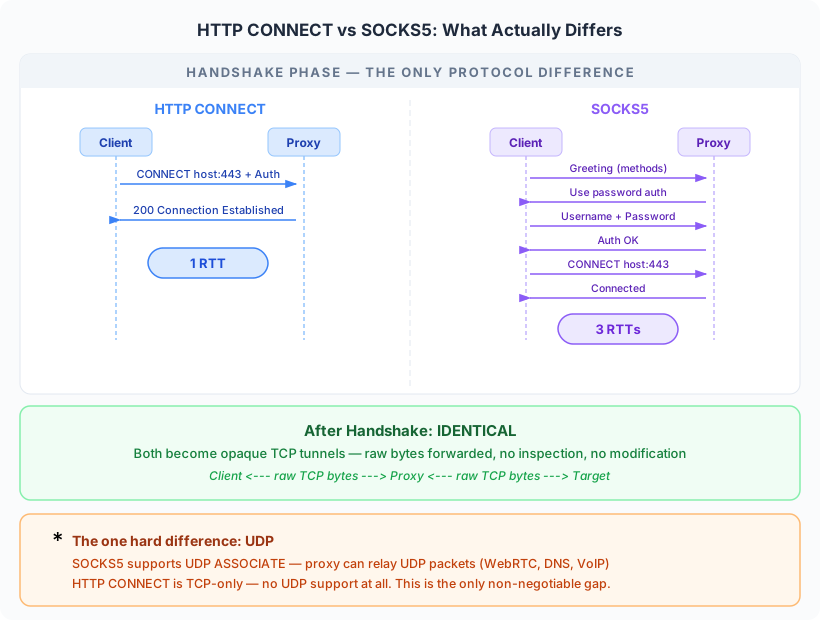
Where SOCKS5 wins: UDP support. SOCKS5 has a UDP ASSOCIATE command. HTTP CONNECT is TCP-only. This is the one hard, non-negotiable protocol-level difference. If you need to proxy UDP traffic (WebRTC, DNS queries, VoIP), SOCKS5 is your only option.
Where HTTP CONNECT wins: connection speed. The SOCKS5 handshake is chattier than HTTP CONNECT, and it adds up:
-
HTTP CONNECT with auth: 1 RTT. The client sends
CONNECT host:portwith aProxy-Authorization: Basic ...header in a single request, server responds200 OK, done. -
SOCKS5 without auth: 2 RTTs. greeting → server picks auth method → connect request → response.
-
SOCKS5 with username/password: 3 RTTs. greeting → server says "send me credentials" → client sends credentials → server confirms → connect request → response.
On a local network this is invisible. On a high-latency mobile connection, which is exactly what mobile proxies are, the extra round trips are noticeable, especially if you're opening many short-lived connections (scraping, API calls).
"Protocol-agnostic": both are. Some articles claim SOCKS5 is "protocol-agnostic from the start" while HTTP CONNECT isn't. This is a stretch. After CONNECT host:port → 200 OK, the HTTP CONNECT tunnel carries whatever TCP traffic you want. The proxy doesn't care what's inside. The only difference is that the handshake itself uses HTTP syntax, which changes nothing about what flows through the tunnel afterward.
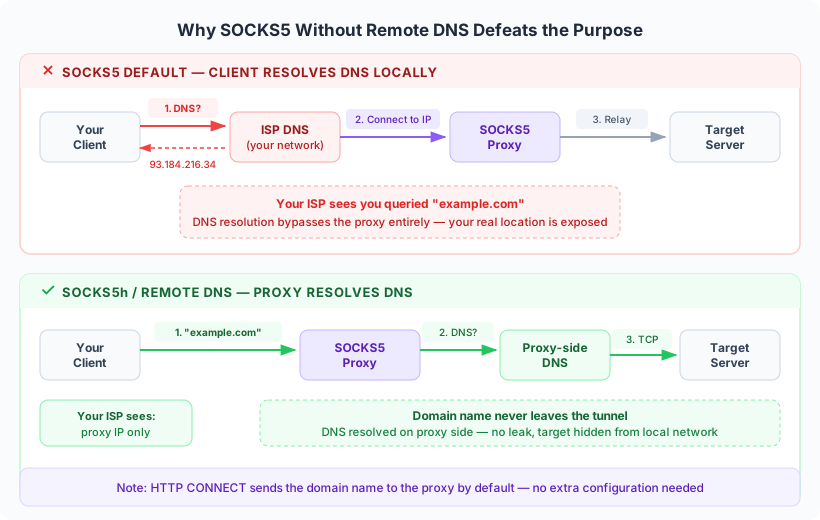
DNS: HTTP CONNECT is actually safer by default. Both protocols can take either an FQDN (like example.com) or a raw IP address. But there's a practical difference:
-
HTTP CONNECT naturally forwards the FQDN to the proxy server, which resolves it. DNS stays on the proxy side.
-
SOCKS5 has two modes: pass the FQDN (sometimes called SOCKS5h), or resolve DNS locally and pass the IP. Many SOCKS5 client implementations default to resolving locally, which leaks your DNS queries to your local resolver, bypassing the proxy entirely. You have to explicitly use SOCKS5h or configure your client to do remote DNS resolution.
In this regard, HTTP CONNECT has fewer footguns. SOCKS5 gives you more control, but the default behavior in many tools is the wrong one.
The real comparison: after the handshake
Here's what most SOCKS5 vs HTTP proxy comparisons get wrong. They describe fundamentally different technologies. But once the connection is established:
| HTTP CONNECT | SOCKS5 | |
|---|---|---|
| What the proxy sees | Target host:port | Target host:port |
| Traffic inspection | None (opaque tunnel) | None (opaque tunnel) |
| Encryption | Depends on app layer (TLS) | Depends on app layer (TLS) |
| Performance overhead | Negligible after handshake | Negligible after handshake |
| Handles HTTPS | Yes | Yes |
They're both TCP tunnels. The proxy just relays bytes. The "SOCKS5 is more secure" claim is mostly a myth; neither protocol adds encryption. Security comes from TLS between your client and the destination, which works identically through both tunnel types.
The real differences are at the edges:
| Feature | HTTP CONNECT | SOCKS5 |
|---|---|---|
| UDP support | No | Yes |
| Handshake RTTs (with auth) | 1 RTT | 3 RTTs |
| DNS leak risk | Low (FQDN forwarded naturally) | Higher (client may resolve locally) |
| Tool support | Universal (every browser, every HTTP library) | Wide, but not universal |
| Firewall traversal | Both equally fingerprintable by DPI; both hideable via TLS wrapper | Same |
| Authentication | Header-based (Basic), sent inline | Separate negotiation phase |
When to use HTTP (CONNECT) proxy
Your tool only supports HTTP proxy. Some older or simpler tools don't have SOCKS5 support. HTTP proxy is universally supported: every browser, every HTTP library, every scraping framework.
You're working exclusively with web traffic, and don't care about HTTP/3. If all you're doing is HTTP/HTTPS requests (scraping, ad verification, account management through a browser), HTTP CONNECT does the job. One nuance: some anti-detect and fingerprinting systems check whether your browser supports HTTP/3 (which runs over QUIC, a UDP-based protocol). If it doesn't, they may slightly lower your trust score. For most scraping and automation this is irrelevant, but if you're working with profiles where fingerprint consistency matters, SOCKS5's UDP support lets HTTP/3 work natively.
You're setting up a quick test. Almost everything defaults to HTTP proxy. Less configuration, fewer compatibility questions.
When to use SOCKS5 proxy
You need UDP. This remains the one hard differentiator between SOCKS5 and HTTP proxy. HTTP/3 (QUIC), WebRTC, VoIP, game traffic, DNS over UDP: if your use case involves any non-TCP protocol, SOCKS5 is your only option among these two. For everything TCP-based (HTTP, HTTPS, WebSocket, raw TCP connections, custom protocols), HTTP CONNECT works equally well. Both are protocol-agnostic for TCP traffic; neither can handle ICMP or other network-layer protocols.
You're using anti-detect tools that support SOCKS5 UDP. Dolphin{anty}, Multilogin, AdsPower, GoLogin, Octo Browser: these tools work with both protocols. The practical reason to prefer SOCKS5: WebRTC uses UDP, and with SOCKS5 it can use native UDP transport instead of falling back to TCP via TURN. But here's the catch: standard Chromium doesn't route WebRTC through SOCKS5 UDP ASSOCIATE, and most anti-detect tools inherit this limitation. Only a handful (like Octo Browser and Vision) have added custom SOCKS5 UDP support that actually tunnels WebRTC through the proxy. If your tool doesn't support it, the protocol choice won't affect WebRTC behavior either way.
If you need SOCKS5 with real UDP support for anti-detect work, iProxy.online provides both SOCKS5 and HTTP proxy on every device. Configure each port independently, rotate IPs on schedule or via API, and manage everything from a dashboard or Telegram bot. Pricing starts at $6/month per device.
The choice in practice
For most users working with web scraping, social media management, or ad verification: either protocol works fine. The performance difference is negligible, both handle HTTPS, and both provide the same level of privacy (which is: the tunnel is opaque, but neither adds encryption).
The decision often comes down to:
-
What does your tool support? Use what it supports. If it supports both, default to SOCKS5 for UDP flexibility.
-
Do you need UDP? (WebRTC, HTTP/3, VoIP) Then SOCKS5. No alternative.
-
Does your anti-detect tool support SOCKS5 UDP? If yes, SOCKS5 lets WebRTC use native UDP instead of TCP fallback. If not, it doesn't matter.
Don't overthink it. The protocol choice matters far less than the quality of the proxy itself — the IP reputation, the connection stability, the rotation options, and whether you're using clean mobile IPs that haven't been burned by other users.
Common myths, debunked
"HTTP proxies can read your HTTPS traffic" A pure L7 proxy can — via MITM/TLS interception. That's exactly how corporate proxies inspect outbound HTTPS. But it requires the proxy's CA certificate installed on your machine. An HTTP CONNECT proxy — which is what proxy services and scraping tools actually use — creates an opaque tunnel. It sees the destination address, nothing else.
"SOCKS5 is more secure" Neither protocol provides encryption. Security comes from TLS between your client and the destination. Both tunnel types are equally opaque to the proxy server.
"SOCKS5 is faster because it operates at a lower layer" The opposite is true for connection setup. SOCKS5 with auth takes 3 RTTs to establish a tunnel; HTTP CONNECT with auth takes 1 RTT. On high-latency mobile connections, this matters — especially for workloads that open many short-lived connections. After the tunnel is established, both are identical TCP relays.
"You need SOCKS5 for HTTPS" No. HTTP CONNECT has been the standard way to tunnel HTTPS through proxies since the late 1990s. Every browser does it.
"HTTP proxy is outdated, SOCKS5 is the future" Both protocols are mature and stable. HTTP CONNECT is deeply embedded in the web stack and isn't going anywhere. SOCKS5 has one real advantage (UDP support), but "outdated" isn't the right frame. For TCP traffic, both are equally capable.
Summary
| If you need... | Use... |
|---|---|
| Web scraping / browser automation | Either — both handle all TCP traffic equally |
| Anti-detect tools with WebRTC | SOCKS5 — but only if the tool supports SOCKS5 UDP (most Chromium-based ones don't) |
| UDP traffic (HTTP/3, VoIP, WebRTC, games) | SOCKS5 (HTTP CONNECT can't do UDP) |
| Maximum tool compatibility | HTTP CONNECT (universally supported) |
| Lowest connection latency | HTTP CONNECT (1 RTT vs 3 RTTs with auth) |
| Custom TCP applications (WebSocket, raw TCP) | Either — both are protocol-agnostic for TCP |
The biggest takeaway: SOCKS5 and HTTP CONNECT proxies are far more similar than different. Both are TCP tunnels. Both are protocol-agnostic for TCP traffic. The one hard differentiator is UDP support — everything else (handshake format, tool compatibility, DNS behavior) is a minor edge. Pick based on whether you actually need UDP, not on blog posts that confuse Layer 7 forwarding proxies with Layer 4 CONNECT tunnels.
Whether you choose SOCKS5 or HTTP — the proxy quality matters more than the protocol. iProxy.online supports both on every device, with IP rotation, multiple ports, and real mobile IPs from your own SIM cards. Start a free 48-hour trial — no credit card needed.
- Best Mobile Proxy Providers [2026]

- How to Set Up Remote Change of IP Address Through iProxy.online?
- How to Make Money With Proxies [The Complete Guide]
- How to Increase the Proxy Speed: Detailed Guide
- Guide for setting up mobile proxies in iProxy.online
- All about .OVPN configs, UDP, HTTP/3, QUIQ support
- What is Wi-Fi Split? How does it help to increase the speed and reduce traffic consumption?
- Replace passive OS fingerprint in mobile proxies
- List of recommended phones for iProxy.online
- How to choose the right location of the server?
What is the difference between SOCKS5 and HTTP proxy?
Both create TCP tunnels that relay traffic without reading it. The main differences: SOCKS5 supports UDP (HTTP CONNECT doesn't), HTTP CONNECT establishes connections faster (1 RTT vs 3), and SOCKS5 has a higher DNS leak risk if the client resolves names locally instead of passing them to the proxy.
Is SOCKS5 faster than HTTP proxy?
Not for connection setup — SOCKS5 with authentication requires 3 round trips vs 1 for HTTP CONNECT. After the tunnel is established, both relay bytes at the same speed. On high-latency mobile proxy connections, the extra handshake RTTs are noticeable when opening many short-lived connections.
Is SOCKS5 more secure than HTTP proxy?
No. Neither protocol adds encryption. Your security comes from TLS (HTTPS) between your client and the destination server, which works identically through both tunnel types. The "SOCKS5 is more secure" claim likely confuses HTTP CONNECT tunnels with Layer 7 MITM proxies.
Do I need SOCKS5 for web scraping?
Usually not. Web scraping is TCP-based (HTTP/HTTPS), and HTTP CONNECT handles it just as well as SOCKS5. Choose SOCKS5 only if you specifically need UDP support — for example, to support HTTP/3 (QUIC) or WebRTC in anti-detect browser profiles.
Can HTTP proxy handle HTTPS traffic?
Yes. HTTP CONNECT has been the standard method for tunneling HTTPS through proxies since the late 1990s. The proxy creates a TCP tunnel to the destination, and your TLS-encrypted traffic passes through without the proxy being able to read it.
 Sign up with Google
- Best Mobile Proxy Providers [2026]
- How to Set Up Remote Change of IP Address Through iProxy.online?
- How to Make Money With Proxies [The Complete Guide]
- How to Increase the Proxy Speed: Detailed Guide
- Guide for setting up mobile proxies in iProxy.online
- All about .OVPN configs, UDP, HTTP/3, QUIQ support
- What is Wi-Fi Split? How does it help to increase the speed and reduce traffic consumption?
- Replace passive OS fingerprint in mobile proxies
- List of recommended phones for iProxy.online
- How to choose the right location of the server?


